ZAR: A New Archive Format with a Python API
Have you ever been bored because of slow compression/decompression tools? Because speed matters, I’ve developed a new archive format with very fast tools.
ZAR is a new archive format, not just another Python wrapper around ZIP or TAR. It is designed to combine fast parallel Zstandard compression with features that the familiar formats don’t offer together: content deduplication, versioned commits, historical restores, and recovery checks.
The format is implemented in Rust and comes with a native Python API. Create archives quickly, keep earlier file versions in the same archive, and restore part of the archive without unpacking everything.
And Python is just one way to use it: the same Rust library also powers a command-line tool, a desktop archive manager, and bindings for many other languages.
What makes the format different?
Most archive formats are great at packaging files. ZAR is built to manage changes to those files over time, too. Each update can add a commit while preserving earlier states, so you can inspect or restore history without keeping a separate full archive for every version.
| Capability | ZAR | ZIP | tar.gz | 7z |
|---|---|---|---|---|
| Parallel, block-based Zstandard compression | Yes | No (Deflate) | No (single-threaded gzip) | No (typical LZMA workflows) |
| Commit-based updates and historical states | Yes | Appendable, not versioned | No | No |
| Within-commit content deduplication | Yes | No | No | Solid blocks only |
| Random access to a file | Yes | Yes | No | Limited by solid blocks |
| Per-block checksums and recovery scan past damaged regions | Yes | CRC; no recovery scan | No | Limited |
| Authenticated encryption with per-commit passwords | Yes | Varies | No (requires a wrapper) | AES-CBC |
These are not just checkboxes: commits let you update an archive without discarding the old state, deduplication avoids storing duplicate content within a create or add operation, and block framing lets ZAR compress in parallel and verify individual blocks. The result is a format for people who want both quick archive operations and useful history.
Why Python developers should take a look
🚀 Fast compression, without leaving Python
The Python package, pyzarlib, is a PyO3 extension for the Rust archive library.
ZAR splits data into blocks and compresses them in parallel with Zstandard.
Long-running Rust operations release Python’s GIL, so other Python threads can
keep working while an archive operation is running.
In one unencrypted, hot-cache benchmark on a Linux Core i7-10700, ZAR compressed a 525 MiB Linux source tree in 0.86 seconds. In the same run, ZIP took 11.01 seconds and 7z took 24.91 seconds. ZAR’s archive was 115.5 MiB—smaller than ZIP’s 151.1 MiB, though not as small as 7z’s 81.1 MiB. If you need a much smaller archive, 7z may be the better fit; if you want a compelling balance of compression time and size, ZAR is worth a try.
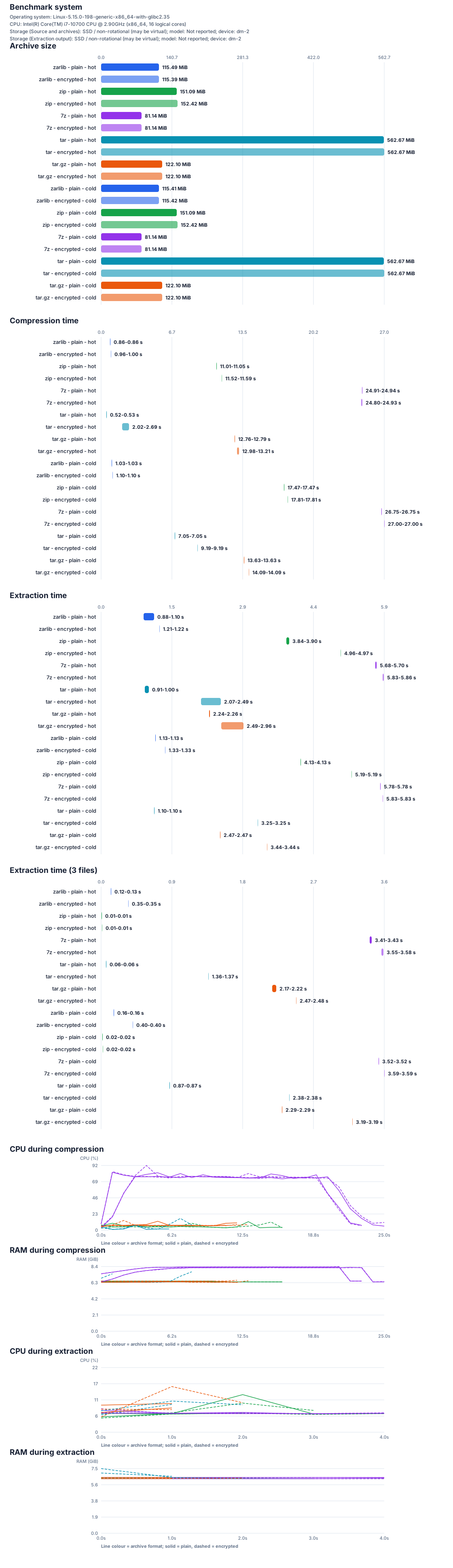
The full benchmark report includes extraction times, cold-cache runs, and details about the test setup.
🐍 Python API — and a CLI for Python workflows
Create, update, inspect, verify, and extract archives directly from Python.
Inputs accept pathlib.Path as well as strings:
from pathlib import Path

import pyzarlib

archive = Path("backup.zar")

created = pyzarlib.create_archive(
    archive,
    [Path("src"), Path("README.md")],
)
print(f"Created with {len(created['warnings'])} warning(s)")

# Add a new commit. Earlier file versions remain in the archive history.
pyzarlib.add_archive(archive, [Path("README.md")])

# Store and read custom archive-level metadata.
pyzarlib.update_custom_metadata(
    archive,
    set={"project": "example", "revision": 1},
)
metadata = pyzarlib.read_custom_metadata(archive)
print(metadata["project"], metadata["revision"])

for entry in pyzarlib.list_archive(archive):
    print(entry["path"], entry["type"])

check = pyzarlib.check_archive(archive)
print(f"Verified {check['commits']} commit(s)")

# Preview a restore before writing files.
plan = pyzarlib.extract_archive(
    archive,
    "restored",
    dry_run=True,
)
print(f"Would extract {len(plan['files'])} files")
Custom metadata values can be strings, signed integers, or finite floats.
Updating metadata appends a metadata-only commit; keys beginning with zar.
are reserved. Metadata updates require an unencrypted archive.
To append an encrypted commit to the archive above and read its file back:
from getpass import getpass

password = getpass("Commit password: ").encode("utf-8")
pyzarlib.add_archive(
    archive,
    [Path("secrets.txt")],
    password=password,
    encryption_scope="header-and-data",
)

contents = pyzarlib.extract_archive_to_memory(archive, password=password)
print(f"Read {len(contents['secrets.txt'])} bytes")
Only the new commit is encrypted; earlier commits remain unchanged. Without
the password, commits with encrypted headers are skipped, so a listing or
extraction can show only part of the archive. For commits with different
passwords, pass a passwords mapping from commit IDs to password bytes.
Need a terminal workflow? The package also provides zarc-py, a Python CLI
for creating, adding, removing, joining, undoing, checking, listing, inspecting,
and extracting archives.
The package supports Python 3.11 and newer, with CI coverage for CPython 3.11–3.15 and free-threaded CPython 3.14t and 3.15t. Native work releases the GIL, and the extension is tested with concurrent Python calls.
🗜️ Compression controls and familiar archive inputs
Choose a Zstandard compression level from -7 to 22 and a block size from 64 KiB to 32 MiB, or let ZAR select a block size automatically. Default compression level is 3. Files with identical content can be deduplicated within a create or add operation. Some already-compressed formats and media are stored without an extra compression pass to improve compression speed.
You don’t have to start with a ZAR archive. Python create_archive and
add_archive can import entries from ZIP, 7z, RAR, ISO, TAR, TAR.GZ, TGZ,
and GZ files, preserving their internal paths. Encrypted ZIP/7z/RAR inputs
and some special archive entries are not supported; see the project
documentation for the precise limits.
More than a compressed file
ZAR archives are built around commits:
- Add new or changed files without throwing away earlier versions.
- Arbitrary metadata as key-value pairs can be added to the archive and is saved in metadata only commits.
- Remove paths while retaining their previous contents in history.
- Undo trailing commits or join a commit range to compact history.
- List and inspect archive metadata without decompressing file contents.
- Extract one file or read file data into memory, instead of unpacking the whole archive.
- Filter files and folders by patterns during creation, listing, and extraction.
- Encrypt headers, data, or both with AES-256-GCM or ChaCha20-Poly1305.
That makes ZAR useful for more than a one-off download bundle: it can serve as a compact, inspectable history of project snapshots or application data.
One Rust core, many ways to use it
The shared archive library is available through:
| Language or runtime | Integration |
|---|---|
| Rust | Native zarlib crate |
| Python | PyO3 pyzarlib extension |
| C and C++ | czarlib C ABI and cxxzarlib |
| Go | gozarlib through cgo |
| Java | FFM and JNI bindings |
| C# | P/Invoke binding |
| WASI | WebAssembly Component; Node.js integration is available |
You can use the zarc command-line tool, manage archives in the zarg desktop
application, or connect an AI client to the local zarmcp server. The
companion zcopy tool transfers file trees over a network using compressed,
optionally encrypted ZAR batches. Try it out. You’ll be impressed how fast you
can transfer big file trees over the network without creating (temporary) archives.
Installation
Build the Python extension from the project source with Maturin:
python -m pip install maturin
cd pyzarlib
maturin develop --release
Then import pyzarlib in your Python code. The repository includes
Python installation and API documentation,
examples, and tests.
Get started
If you’re a Python developer who wants quicker archives without giving up a comfortable Python API, try ZAR on a representative dataset. The benchmark includes machine and method details so you can compare it against your own workload—not just trust a headline number.
Explore the source, complete documentation, and benchmark reports:
https://github.com/brmmm3/zar-rs
Licensed under the MIT or Apache-2.0 License.