<?xml version="1.0" encoding="utf-8"?><feed xmlns="http://www.w3.org/2005/Atom" ><generator uri="https://jekyllrb.com/" version="3.10.0">Jekyll</generator><link href="https://brmmm3.github.io/feed.xml" rel="self" type="application/atom+xml" /><link href="https://brmmm3.github.io/" rel="alternate" type="text/html" /><updated>2026-11-15T07:18:58+00:00</updated><id>https://brmmm3.github.io/feed.xml</id><title type="html">Speed matters blog</title><subtitle>A blog about writing fast Python code</subtitle><author><name>Marty B.</name></author><entry><title type="html">zar-rs</title><link href="https://brmmm3.github.io/posts/2026/11/15/zar-rs/" rel="alternate" type="text/html" title="zar-rs" /><published>2026-11-15T07:00:00+00:00</published><updated>2026-11-15T07:00:00+00:00</updated><id>https://brmmm3.github.io/posts/2026/11/15/zar-rs</id><content type="html" xml:base="https://brmmm3.github.io/posts/2026/11/15/zar-rs/"><![CDATA[<h1 id="zar-a-new-archive-format-with-a-python-api">ZAR: A New Archive Format with a Python API</h1>

<p><strong>Have you ever been bored because of slow compression/decompression tools? Because speed matters, I’ve developed a new archive format with very fast tools.</strong></p>

<p>ZAR is a <strong>new archive format</strong>, not just another Python wrapper around ZIP or
TAR. It is designed to combine fast parallel Zstandard compression with
features that the familiar formats don’t offer together: content deduplication,
versioned commits, historical restores, and recovery checks.</p>

<p>The format is implemented in Rust and comes with a native Python API. Create
archives quickly, keep earlier file versions in the same archive, and restore
part of the archive without unpacking everything.</p>

<p>And Python is just one way to use it: the same Rust library also powers a
command-line tool, a desktop archive manager, and bindings for many other languages.</p>

<h2 id="what-makes-the-format-different">What makes the format different?</h2>

<p>Most archive formats are great at packaging files. ZAR is built to manage
changes to those files over time, too. Each update can add a commit while
preserving earlier states, so you can inspect or restore history without
keeping a separate full archive for every version.</p>

<table>
  <thead>
    <tr>
      <th>Capability</th>
      <th>ZAR</th>
      <th>ZIP</th>
      <th>tar.gz</th>
      <th>7z</th>
    </tr>
  </thead>
  <tbody>
    <tr>
      <td>Parallel, block-based Zstandard compression</td>
      <td>Yes</td>
      <td>No (Deflate)</td>
      <td>No (single-threaded gzip)</td>
      <td>No (typical LZMA workflows)</td>
    </tr>
    <tr>
      <td>Commit-based updates and historical states</td>
      <td>Yes</td>
      <td>Appendable, not versioned</td>
      <td>No</td>
      <td>No</td>
    </tr>
    <tr>
      <td>Within-commit content deduplication</td>
      <td>Yes</td>
      <td>No</td>
      <td>No</td>
      <td>Solid blocks only</td>
    </tr>
    <tr>
      <td>Random access to a file</td>
      <td>Yes</td>
      <td>Yes</td>
      <td>No</td>
      <td>Limited by solid blocks</td>
    </tr>
    <tr>
      <td>Per-block checksums and recovery scan past damaged regions</td>
      <td>Yes</td>
      <td>CRC; no recovery scan</td>
      <td>No</td>
      <td>Limited</td>
    </tr>
    <tr>
      <td>Authenticated encryption with per-commit passwords</td>
      <td>Yes</td>
      <td>Varies</td>
      <td>No (requires a wrapper)</td>
      <td>AES-CBC</td>
    </tr>
  </tbody>
</table>

<p>These are not just checkboxes: commits let you update an archive without
discarding the old state, deduplication avoids storing duplicate content
within a create or add operation, and block framing lets ZAR compress in
parallel and verify individual blocks. The result is a format for people who
want both quick archive operations and useful history.</p>

<h2 id="why-python-developers-should-take-a-look">Why Python developers should take a look</h2>

<h3 id="-fast-compression-without-leaving-python">🚀 Fast compression, without leaving Python</h3>

<p>The Python package, <code class="language-plaintext highlighter-rouge">pyzarlib</code>, is a PyO3 extension for the Rust archive library.
ZAR splits data into blocks and compresses them in parallel with Zstandard.
Long-running Rust operations release Python’s GIL, so other Python threads can
keep working while an archive operation is running.</p>

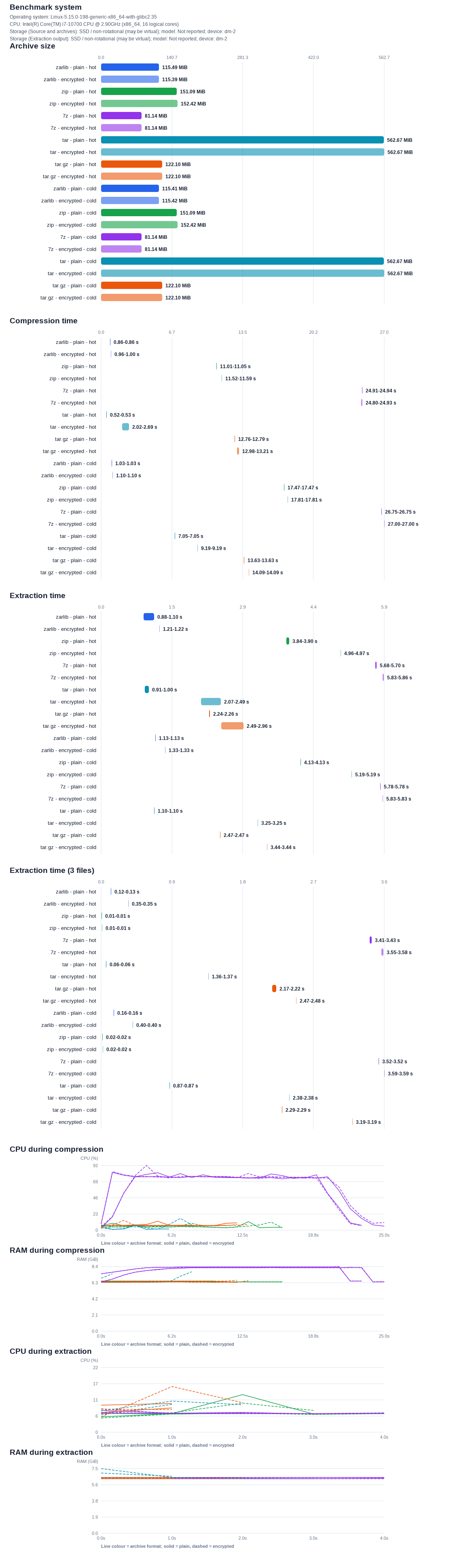
<p>In one unencrypted, hot-cache benchmark on a Linux Core i7-10700, ZAR
compressed a 525 MiB Linux source tree in <strong>0.86 seconds</strong>. In the same run,
ZIP took <strong>11.01 seconds</strong> and 7z took <strong>24.91 seconds</strong>. ZAR’s archive was
<strong>115.5 MiB</strong>—smaller than
ZIP’s 151.1 MiB, though not as small as 7z’s 81.1 MiB. If you need a much
smaller archive, 7z may be the better fit; if you want a compelling balance of
compression time and size, ZAR is worth a try.</p>

<figure>
    <img src="https://raw.githubusercontent.com/brmmm3/zar-rs/master/doc/benchmarks/benchmark-charts-linux-x86_64-core-i7.svg" width="78%" alt="ZAR archive benchmark results on a Linux Core i7-10700" />
    <figcaption>One hot-cache run on a Linux Core i7-10700; results vary by machine, storage, and data.</figcaption>
</figure>

<p>The <a href="https://github.com/brmmm3/zar-rs/blob/master/doc/benchmarks/benchmark-report-linux-x86_64-core-i7.md">full benchmark report</a>
includes extraction times, cold-cache runs, and details about the test setup.</p>

<h3 id="-python-api--and-a-cli-for-python-workflows">🐍 Python API — and a CLI for Python workflows</h3>

<p>Create, update, inspect, verify, and extract archives directly from Python.
Inputs accept <code class="language-plaintext highlighter-rouge">pathlib.Path</code> as well as strings:</p>

<div class="language-python highlighter-rouge"><div class="highlight"><pre class="highlight"><code><span class="kn">from</span> <span class="nn">pathlib</span> <span class="kn">import</span> <span class="n">Path</span>

<span class="kn">import</span> <span class="nn">pyzarlib</span>

<span class="n">archive</span> <span class="o">=</span> <span class="n">Path</span><span class="p">(</span><span class="s">"backup.zar"</span><span class="p">)</span>

<span class="n">created</span> <span class="o">=</span> <span class="n">pyzarlib</span><span class="p">.</span><span class="n">create_archive</span><span class="p">(</span>
    <span class="n">archive</span><span class="p">,</span>
    <span class="p">[</span><span class="n">Path</span><span class="p">(</span><span class="s">"src"</span><span class="p">),</span> <span class="n">Path</span><span class="p">(</span><span class="s">"README.md"</span><span class="p">)],</span>
<span class="p">)</span>
<span class="k">print</span><span class="p">(</span><span class="sa">f</span><span class="s">"Created with </span><span class="si">{</span><span class="nb">len</span><span class="p">(</span><span class="n">created</span><span class="p">[</span><span class="s">'warnings'</span><span class="p">])</span><span class="si">}</span><span class="s"> warning(s)"</span><span class="p">)</span>

<span class="c1"># Add a new commit. Earlier file versions remain in the archive history.
</span><span class="n">pyzarlib</span><span class="p">.</span><span class="n">add_archive</span><span class="p">(</span><span class="n">archive</span><span class="p">,</span> <span class="p">[</span><span class="n">Path</span><span class="p">(</span><span class="s">"README.md"</span><span class="p">)])</span>

<span class="c1"># Store and read custom archive-level metadata.
</span><span class="n">pyzarlib</span><span class="p">.</span><span class="n">update_custom_metadata</span><span class="p">(</span>
    <span class="n">archive</span><span class="p">,</span>
    <span class="nb">set</span><span class="o">=</span><span class="p">{</span><span class="s">"project"</span><span class="p">:</span> <span class="s">"example"</span><span class="p">,</span> <span class="s">"revision"</span><span class="p">:</span> <span class="mi">1</span><span class="p">},</span>
<span class="p">)</span>
<span class="n">metadata</span> <span class="o">=</span> <span class="n">pyzarlib</span><span class="p">.</span><span class="n">read_custom_metadata</span><span class="p">(</span><span class="n">archive</span><span class="p">)</span>
<span class="k">print</span><span class="p">(</span><span class="n">metadata</span><span class="p">[</span><span class="s">"project"</span><span class="p">],</span> <span class="n">metadata</span><span class="p">[</span><span class="s">"revision"</span><span class="p">])</span>

<span class="k">for</span> <span class="n">entry</span> <span class="ow">in</span> <span class="n">pyzarlib</span><span class="p">.</span><span class="n">list_archive</span><span class="p">(</span><span class="n">archive</span><span class="p">):</span>
    <span class="k">print</span><span class="p">(</span><span class="n">entry</span><span class="p">[</span><span class="s">"path"</span><span class="p">],</span> <span class="n">entry</span><span class="p">[</span><span class="s">"type"</span><span class="p">])</span>

<span class="n">check</span> <span class="o">=</span> <span class="n">pyzarlib</span><span class="p">.</span><span class="n">check_archive</span><span class="p">(</span><span class="n">archive</span><span class="p">)</span>
<span class="k">print</span><span class="p">(</span><span class="sa">f</span><span class="s">"Verified </span><span class="si">{</span><span class="n">check</span><span class="p">[</span><span class="s">'commits'</span><span class="p">]</span><span class="si">}</span><span class="s"> commit(s)"</span><span class="p">)</span>

<span class="c1"># Preview a restore before writing files.
</span><span class="n">plan</span> <span class="o">=</span> <span class="n">pyzarlib</span><span class="p">.</span><span class="n">extract_archive</span><span class="p">(</span>
    <span class="n">archive</span><span class="p">,</span>
    <span class="s">"restored"</span><span class="p">,</span>
    <span class="n">dry_run</span><span class="o">=</span><span class="bp">True</span><span class="p">,</span>
<span class="p">)</span>
<span class="k">print</span><span class="p">(</span><span class="sa">f</span><span class="s">"Would extract </span><span class="si">{</span><span class="nb">len</span><span class="p">(</span><span class="n">plan</span><span class="p">[</span><span class="s">'files'</span><span class="p">])</span><span class="si">}</span><span class="s"> files"</span><span class="p">)</span>
</code></pre></div></div>

<p>Custom metadata values can be strings, signed integers, or finite floats.
Updating metadata appends a metadata-only commit; keys beginning with <code class="language-plaintext highlighter-rouge">zar.</code>
are reserved. Metadata updates require an unencrypted archive.</p>

<p>To append an encrypted commit to the archive above and read its file back:</p>

<div class="language-python highlighter-rouge"><div class="highlight"><pre class="highlight"><code><span class="kn">from</span> <span class="nn">getpass</span> <span class="kn">import</span> <span class="n">getpass</span>

<span class="n">password</span> <span class="o">=</span> <span class="n">getpass</span><span class="p">(</span><span class="s">"Commit password: "</span><span class="p">).</span><span class="n">encode</span><span class="p">(</span><span class="s">"utf-8"</span><span class="p">)</span>
<span class="n">pyzarlib</span><span class="p">.</span><span class="n">add_archive</span><span class="p">(</span>
    <span class="n">archive</span><span class="p">,</span>
    <span class="p">[</span><span class="n">Path</span><span class="p">(</span><span class="s">"secrets.txt"</span><span class="p">)],</span>
    <span class="n">password</span><span class="o">=</span><span class="n">password</span><span class="p">,</span>
    <span class="n">encryption_scope</span><span class="o">=</span><span class="s">"header-and-data"</span><span class="p">,</span>
<span class="p">)</span>

<span class="n">contents</span> <span class="o">=</span> <span class="n">pyzarlib</span><span class="p">.</span><span class="n">extract_archive_to_memory</span><span class="p">(</span><span class="n">archive</span><span class="p">,</span> <span class="n">password</span><span class="o">=</span><span class="n">password</span><span class="p">)</span>
<span class="k">print</span><span class="p">(</span><span class="sa">f</span><span class="s">"Read </span><span class="si">{</span><span class="nb">len</span><span class="p">(</span><span class="n">contents</span><span class="p">[</span><span class="s">'secrets.txt'</span><span class="p">])</span><span class="si">}</span><span class="s"> bytes"</span><span class="p">)</span>
</code></pre></div></div>

<p>Only the new commit is encrypted; earlier commits remain unchanged. Without
the password, commits with encrypted headers are skipped, so a listing or
extraction can show only part of the archive. For commits with different
passwords, pass a <code class="language-plaintext highlighter-rouge">passwords</code> mapping from commit IDs to password bytes.</p>

<p>Need a terminal workflow? The package also provides <strong><code class="language-plaintext highlighter-rouge">zarc-py</code></strong>, a Python CLI
for creating, adding, removing, joining, undoing, checking, listing, inspecting,
and extracting archives.</p>

<p>The package supports <strong>Python 3.11 and newer</strong>, with CI coverage for CPython
3.11–3.15 and free-threaded CPython 3.14t and 3.15t. Native work releases the
GIL, and the extension is tested with concurrent Python calls.</p>

<h3 id="️-compression-controls-and-familiar-archive-inputs">🗜️ Compression controls and familiar archive inputs</h3>

<p>Choose a Zstandard compression level from <strong>-7 to 22</strong> and a block size from
<strong>64 KiB to 32 MiB</strong>, or let ZAR select a block size automatically.
Default compression level is 3. Files with identical content can be deduplicated
within a create or add operation. Some already-compressed formats and media are
stored without an extra compression pass to improve compression speed.</p>

<p>You don’t have to start with a ZAR archive. Python <code class="language-plaintext highlighter-rouge">create_archive</code> and
<code class="language-plaintext highlighter-rouge">add_archive</code> can import entries from <strong>ZIP, 7z, RAR, ISO, TAR, TAR.GZ, TGZ,
and GZ</strong> files, preserving their internal paths. Encrypted ZIP/7z/RAR inputs
and some special archive entries are not supported; see the project
documentation for the precise limits.</p>

<h2 id="more-than-a-compressed-file">More than a compressed file</h2>

<p>ZAR archives are built around commits:</p>

<ul>
  <li><strong>Add</strong> new or changed files without throwing away earlier versions.</li>
  <li><strong>Arbitrary metadata</strong> as key-value pairs can be added to the archive and is saved in metadata only commits.</li>
  <li><strong>Remove</strong> paths while retaining their previous contents in history.</li>
  <li><strong>Undo</strong> trailing commits or <strong>join</strong> a commit range to compact history.</li>
  <li><strong>List</strong> and inspect archive metadata without decompressing file contents.</li>
  <li><strong>Extract one file</strong> or read file data into memory, instead of unpacking the
whole archive.</li>
  <li><strong>Filter</strong> files and folders by patterns during creation, listing, and
extraction.</li>
  <li><strong>Encrypt</strong> headers, data, or both with AES-256-GCM or ChaCha20-Poly1305.</li>
</ul>

<p>That makes ZAR useful for more than a one-off download bundle: it can serve as
a compact, inspectable history of project snapshots or application data.</p>

<h2 id="one-rust-core-many-ways-to-use-it">One Rust core, many ways to use it</h2>

<p>The shared archive library is available through:</p>

<table>
  <thead>
    <tr>
      <th>Language or runtime</th>
      <th>Integration</th>
    </tr>
  </thead>
  <tbody>
    <tr>
      <td>Rust</td>
      <td>Native <code class="language-plaintext highlighter-rouge">zarlib</code> crate</td>
    </tr>
    <tr>
      <td>Python</td>
      <td>PyO3 <code class="language-plaintext highlighter-rouge">pyzarlib</code> extension</td>
    </tr>
    <tr>
      <td>C and C++</td>
      <td><code class="language-plaintext highlighter-rouge">czarlib</code> C ABI and <code class="language-plaintext highlighter-rouge">cxxzarlib</code></td>
    </tr>
    <tr>
      <td>Go</td>
      <td><code class="language-plaintext highlighter-rouge">gozarlib</code> through cgo</td>
    </tr>
    <tr>
      <td>Java</td>
      <td>FFM and JNI bindings</td>
    </tr>
    <tr>
      <td>C#</td>
      <td>P/Invoke binding</td>
    </tr>
    <tr>
      <td>WASI</td>
      <td>WebAssembly Component; Node.js integration is available</td>
    </tr>
  </tbody>
</table>

<p>You can use the <code class="language-plaintext highlighter-rouge">zarc</code> command-line tool, manage archives in the <code class="language-plaintext highlighter-rouge">zarg</code> desktop
application, or connect an AI client to the local <code class="language-plaintext highlighter-rouge">zarmcp</code> server. The
companion <code class="language-plaintext highlighter-rouge">zcopy</code> tool transfers file trees over a network using compressed,
optionally encrypted ZAR batches. Try it out. You’ll be impressed how fast you
can transfer big file trees over the network without creating (temporary) archives.</p>

<h2 id="installation">Installation</h2>

<p>Build the Python extension from the project source with <a href="https://maturin.rs">Maturin</a>:</p>

<div class="language-bash highlighter-rouge"><div class="highlight"><pre class="highlight"><code>python <span class="nt">-m</span> pip <span class="nb">install </span>maturin
<span class="nb">cd </span>pyzarlib
maturin develop <span class="nt">--release</span>
</code></pre></div></div>

<p>Then import <code class="language-plaintext highlighter-rouge">pyzarlib</code> in your Python code. The repository includes
<a href="https://github.com/brmmm3/zar-rs/blob/master/pyzarlib/README.md">Python installation and API documentation</a>,
examples, and tests.</p>

<h2 id="get-started">Get started</h2>

<p>If you’re a Python developer who wants quicker archives without giving up a
comfortable Python API, try ZAR on a representative dataset. The benchmark
includes machine and method details so you can compare it against your own
workload—not just trust a headline number.</p>

<p>Explore the source, complete documentation, and benchmark reports:</p>

<p><a href="https://github.com/brmmm3/zar-rs">https://github.com/brmmm3/zar-rs</a></p>

<p>Licensed under the MIT or Apache-2.0 License.</p>]]></content><author><name>Marty B.</name></author><category term="posts" /><summary type="html"><![CDATA[ZAR: A New Archive Format with a Python API]]></summary></entry><entry><title type="html">fastlogging-rs</title><link href="https://brmmm3.github.io/posts/2026/09/16/fastlogging-rs/" rel="alternate" type="text/html" title="fastlogging-rs" /><published>2026-09-16T07:40:00+00:00</published><updated>2026-09-16T07:40:00+00:00</updated><id>https://brmmm3.github.io/posts/2026/09/16/fastlogging-rs</id><content type="html" xml:base="https://brmmm3.github.io/posts/2026/09/16/fastlogging-rs/"><![CDATA[<h1 id="fastlogging-rs-high-performance-logging-for-many-different-programming-languages">fastlogging-rs: High-Performance Logging for many different Programming Languages</h1>

<p><strong>Logging is often the hidden bottleneck in your application.</strong></p>

<p>Every <code class="language-plaintext highlighter-rouge">log.info(...)</code> call can block your hot path, serialize your threads, and slow down your I/O-bound workloads.
That’s why I created <strong>fastlogging-rs</strong>: a Rust-powered logging framework that is extremely fast, thread-safe,
and available with a similar API in <strong>8 different programming languages</strong>.</p>

<p>My first release, 0.8.1, is available with the following features:</p>

<ul>
  <li>Initial release of the Rust core (<code class="language-plaintext highlighter-rouge">fastlogging</code> crate) with bindings for Python, C, C++, Go, Java (FFM and JNI) and C#</li>
  <li>Non-blocking, asynchronous logging — writers run in background threads</li>
  <li>Optional file rotation and compression</li>
  <li>Optional AES encryption for network logging</li>
  <li>Configuration via API or configuration file (JSON, XML, YAML)</li>
  <li>Automatic forwarding of log messages from sub processes to the main process</li>
</ul>

<h2 id="why-fastlogging-rs">Why fastlogging-rs?</h2>

<p>Because speed matters…</p>

<h3 id="-significant-performance-improvements">🚀 Significant Performance Improvements</h3>

<p>Compared to Python’s built-in <code class="language-plaintext highlighter-rouge">logging</code> module:</p>

<ul>
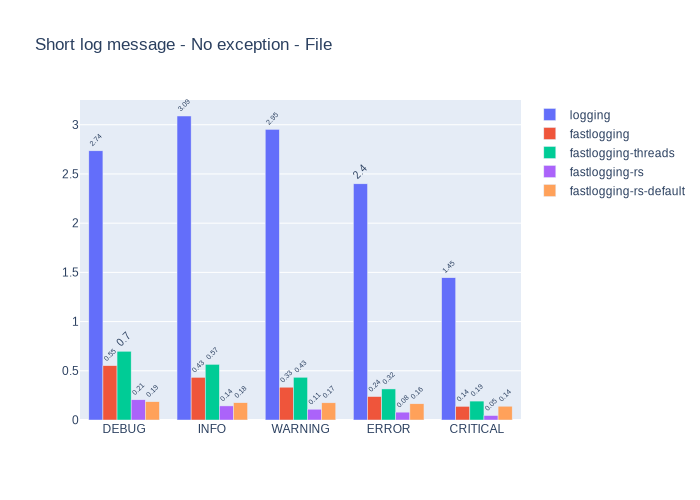
  <li><strong>Writing to a file</strong> is up to <strong>147× faster</strong></li>
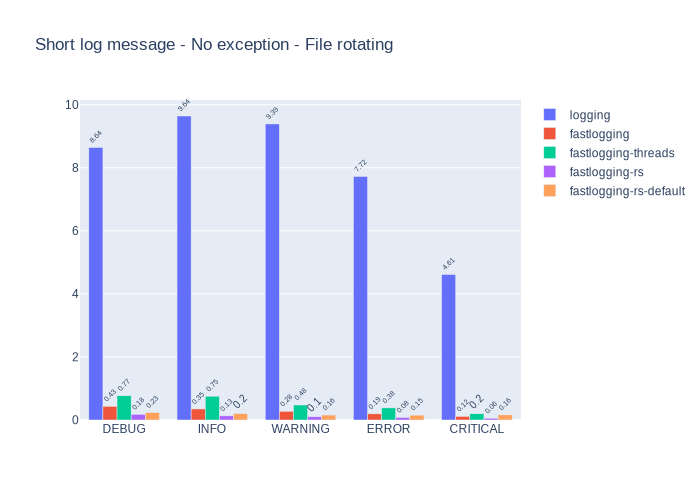
  <li><strong>Rotating file logging</strong> is up to <strong>207× faster</strong></li>
  <li>Even compared to <strong>Apache Log4j</strong>, fastlogging-rs is up to <strong>9× faster</strong></li>
</ul>

<p>When your application logs millions of messages, these speedups can turn minutes into seconds.</p>

<h3 id="benchmarks-results-for-writing-to-a-file">Benchmarks results for writing to a file</h3>

<figure>
    <img src="https://raw.githubusercontent.com/brmmm3/fastlogging-rs/master/docs/benchmarks/short-noexc-file.svg" width="48%" alt="fastlogging-rs file benchmark" />
    <figcaption>fastlogging-rs file writer benchmark</figcaption>
</figure>

<figure>
    <img src="https://raw.githubusercontent.com/brmmm3/fastlogging-rs/master/docs/benchmarks/short-noexc-rotate.svg" width="48%" alt="fastlogging-rs rotating file benchmark" />
    <figcaption>fastlogging-rs rotating file writer benchmark</figcaption>
</figure>

<h3 id="-one-framework-8-languages">🌍 One Framework, 8 Languages</h3>

<p><code class="language-plaintext highlighter-rouge">fastlogging-rs</code> is written in Rust and comes with thin wrappers for your favorite programming language. All bindings share a similar API,
so you can use the same logging concepts across your whole stack:</p>

<table>
  <thead>
    <tr>
      <th>Language</th>
      <th>Binding</th>
      <th>Layer</th>
    </tr>
  </thead>
  <tbody>
    <tr>
      <td>Rust</td>
      <td><code class="language-plaintext highlighter-rouge">fastlogging</code></td>
      <td>Native core</td>
    </tr>
    <tr>
      <td>Python</td>
      <td><code class="language-plaintext highlighter-rouge">pyfastlogging</code></td>
      <td>pyo3 (&gt;= 3.10)</td>
    </tr>
    <tr>
      <td>C</td>
      <td><code class="language-plaintext highlighter-rouge">cfastlogging</code></td>
      <td>FFI (cbindgen header)</td>
    </tr>
    <tr>
      <td>C++</td>
      <td><code class="language-plaintext highlighter-rouge">cxxfastlogging</code></td>
      <td>type-safe <code class="language-plaintext highlighter-rouge">cxx</code> bridge</td>
    </tr>
    <tr>
      <td>C++</td>
      <td><code class="language-plaintext highlighter-rouge">cppfastlogging</code></td>
      <td>C++17 RAII over the C ABI</td>
    </tr>
    <tr>
      <td>Go</td>
      <td><code class="language-plaintext highlighter-rouge">gofastlogging</code></td>
      <td>cgo wrapper</td>
    </tr>
    <tr>
      <td>Java</td>
      <td><code class="language-plaintext highlighter-rouge">jfastlogging-ffm</code></td>
      <td>Foreign Function &amp; Memory API</td>
    </tr>
    <tr>
      <td>Java</td>
      <td><code class="language-plaintext highlighter-rouge">jfastlogging-jni</code></td>
      <td>Java Native Interface</td>
    </tr>
    <tr>
      <td>C#</td>
      <td><code class="language-plaintext highlighter-rouge">csharpfastlogging</code></td>
      <td>P/Invoke</td>
    </tr>
  </tbody>
</table>

<h3 id="-non-blocking-architecture">⚡ Non-Blocking Architecture</h3>

<p>Logging calls are <strong>non-blocking</strong>: each call performs a cheap level check (a single integer comparison, no lock)
and hands the message to a channel. A background <code class="language-plaintext highlighter-rouge">LoggingThread</code> drains that channel and dispatches to each
writer’s own thread. The speed of your writers never slows down your application — as long as the queue
doesn’t run full.</p>

<h3 id="-rich-feature-set">🔧 Rich Feature Set</h3>

<ul>
  <li>Thread-safe logging calls</li>
  <li>Multiple writers (sinks) per logger: console, file, network, syslog, callback</li>
  <li>Optional file rotation and compression</li>
  <li>Optional AES encryption for network logging</li>
  <li>Configuration via API or configuration file (JSON, XML, YAML)</li>
  <li>Automatic forwarding of log messages from sub processes to the main process</li>
</ul>

<h2 id="installation">Installation</h2>

<h3 id="rust">Rust</h3>

<div class="language-bash highlighter-rouge"><div class="highlight"><pre class="highlight"><code>cargo add fastlogging
</code></pre></div></div>

<h3 id="python">Python</h3>

<div class="language-bash highlighter-rouge"><div class="highlight"><pre class="highlight"><code>pip <span class="nb">install </span>pyfastlogging
</code></pre></div></div>

<h2 id="usage-examples">Usage Examples</h2>

<h3 id="rust-1">Rust</h3>

<div class="language-rust highlighter-rouge"><div class="highlight"><pre class="highlight"><code><span class="k">use</span> <span class="nn">fastlogging</span><span class="p">::{</span><span class="n">logging_new_default</span><span class="p">,</span> <span class="n">LoggingError</span><span class="p">};</span>

<span class="k">fn</span> <span class="nf">main</span><span class="p">()</span> <span class="k">-&gt;</span> <span class="nb">Result</span><span class="o">&lt;</span><span class="p">(),</span> <span class="n">LoggingError</span><span class="o">&gt;</span> <span class="p">{</span>
    <span class="k">let</span> <span class="k">mut</span> <span class="k">log</span> <span class="o">=</span> <span class="nf">logging_new_default</span><span class="p">()</span><span class="o">?</span><span class="p">;</span>
    <span class="k">log</span><span class="nf">.info</span><span class="p">(</span><span class="s">"Hello, fastlogging!"</span><span class="p">)</span><span class="o">?</span><span class="p">;</span>
    <span class="k">log</span><span class="nf">.shutdown</span><span class="p">(</span><span class="k">false</span><span class="p">)</span><span class="o">?</span><span class="p">;</span>
    <span class="nf">Ok</span><span class="p">(())</span>
<span class="p">}</span>
</code></pre></div></div>

<h3 id="python-1">Python</h3>

<div class="language-python highlighter-rouge"><div class="highlight"><pre class="highlight"><code><span class="kn">from</span> <span class="nn">fastlogging</span> <span class="kn">import</span> <span class="n">Logging</span>

<span class="n">log</span> <span class="o">=</span> <span class="n">Logging</span><span class="p">()</span>
<span class="n">log</span><span class="p">.</span><span class="n">info</span><span class="p">(</span><span class="s">"Hello, fastlogging!"</span><span class="p">)</span>
<span class="n">log</span><span class="p">.</span><span class="n">shutdown</span><span class="p">(</span><span class="bp">False</span><span class="p">)</span>
</code></pre></div></div>

<h3 id="python-with-a-colored-console-writer">Python with a colored console writer</h3>

<div class="language-python highlighter-rouge"><div class="highlight"><pre class="highlight"><code><span class="kn">from</span> <span class="nn">pyfastlogging</span> <span class="kn">import</span> <span class="n">TRACE</span><span class="p">,</span> <span class="n">Logging</span><span class="p">,</span> <span class="n">ConsoleWriterConfig</span>

<span class="n">logger</span> <span class="o">=</span> <span class="n">Logging</span><span class="p">(</span>
    <span class="n">TRACE</span><span class="p">,</span>
    <span class="s">"main"</span><span class="p">,</span>
    <span class="p">[</span><span class="n">ConsoleWriterConfig</span><span class="p">(</span><span class="n">TRACE</span><span class="p">,</span> <span class="bp">True</span><span class="p">)],</span>
<span class="p">)</span>
<span class="n">logger</span><span class="p">.</span><span class="n">trace</span><span class="p">(</span><span class="s">"Trace Message"</span><span class="p">)</span>
<span class="n">logger</span><span class="p">.</span><span class="n">debug</span><span class="p">(</span><span class="s">"Debug Message"</span><span class="p">)</span>
<span class="n">logger</span><span class="p">.</span><span class="n">info</span><span class="p">(</span><span class="s">"Info Message"</span><span class="p">)</span>
<span class="n">logger</span><span class="p">.</span><span class="n">shutdown</span><span class="p">()</span>
</code></pre></div></div>

<h2 id="benchmark-results">Benchmark Results</h2>

<h3 id="writing-to-a-file">Writing to a file</h3>

<table>
  <thead>
    <tr>
      <th>Framework</th>
      <th>Time</th>
    </tr>
  </thead>
  <tbody>
    <tr>
      <td>Python logging</td>
      <td>29.37s</td>
    </tr>
    <tr>
      <td>log4j</td>
      <td>1.48s</td>
    </tr>
    <tr>
      <td>fastlogging-rs</td>
      <td>0.2s</td>
    </tr>
  </tbody>
</table>

<h3 id="rotating-file-logging">Rotating file logging</h3>

<table>
  <thead>
    <tr>
      <th>Framework</th>
      <th>Time</th>
    </tr>
  </thead>
  <tbody>
    <tr>
      <td>Python logging</td>
      <td>35.24s</td>
    </tr>
    <tr>
      <td>log4j</td>
      <td>1.56s</td>
    </tr>
    <tr>
      <td>fastlogging-rs</td>
      <td>0.17s</td>
    </tr>
  </tbody>
</table>

<p>For detailed benchmark data and methodology, see the benchmark documentation:</p>

<p><a href="https://github.com/brmmm3/fastlogging-rs/blob/master/docs/benchmarks/index.html">https://github.com/brmmm3/fastlogging-rs/blob/master/docs/benchmarks/index.html</a></p>

<p>You can also explore the full benchmark results with interactive charts and tables:</p>

<p><a href="https://brmmm3.github.io/fastlogging-rs/">https://brmmm3.github.io/fastlogging-rs/</a></p>

<h2 id="get-started">Get Started</h2>

<p>If your application spends time logging, fastlogging-rs can provide substantial performance improvements
with minimal code changes — in whichever language you happen to be writing.</p>

<p>The API is intentionally familiar, making migration from <code class="language-plaintext highlighter-rouge">logging</code>, <code class="language-plaintext highlighter-rouge">log4j</code>, or your current framework
straightforward while unlocking significantly faster execution.</p>

<p>Source code, documentation, and issue tracker:</p>

<p><a href="https://github.com/brmmm3/fastlogging-rs">https://github.com/brmmm3/fastlogging-rs</a></p>

<p>Licensed under the MIT or Apache-2.0 License.</p>]]></content><author><name>Marty B.</name></author><category term="posts" /><summary type="html"><![CDATA[fastlogging-rs: High-Performance Logging for many different Programming Languages]]></summary></entry><entry><title type="html">Scandir Rs</title><link href="https://brmmm3.github.io/2026/06/01/scandir-rs/" rel="alternate" type="text/html" title="Scandir Rs" /><published>2026-06-01T00:00:00+00:00</published><updated>2026-06-01T00:00:00+00:00</updated><id>https://brmmm3.github.io/2026/06/01/scandir-rs</id><content type="html" xml:base="https://brmmm3.github.io/2026/06/01/scandir-rs/"><![CDATA[<hr />

<p>layout: post
title: scandir-rs
tagline: Blazing-fast directory traversal for Python — up to 70× faster than os.walk.
date: 2026-06-01 08:40:00 +0100
categories: posts
—————–</p>

<h1 id="scandir-rs-high-performance-directory-traversal-for-python">scandir-rs: High-Performance Directory Traversal for Python</h1>

<p><strong>File system traversal is often a hidden bottleneck.</strong></p>

<p>Whether you’re indexing files, collecting statistics, searching large directory trees, or building developer tools, performance matters.
That’s why I created <strong>scandir-rs</strong>: a Rust-powered Python library designed to be a drop-in replacement for <code class="language-plaintext highlighter-rouge">os.walk()</code> and <code class="language-plaintext highlighter-rouge">os.scandir()</code>,
while delivering dramatically better performance and additional functionality.</p>

<p>A new version (2.9.9) is available with following changes compared to the version I’ve introduced here the last time (2.7.1):</p>

<ul>
  <li>Add support for Python 3.13 and 3.14</li>
  <li>Add support for MacOS on ARM64</li>
  <li>Add support for Linux on PPC64 and S390</li>
  <li>Add SSE builds (for older CPUs which have no AVX) for Linux and Windows</li>
  <li>Add optional argument <code class="language-plaintext highlighter-rouge">follow_links</code>.</li>
  <li>Changed <code class="language-plaintext highlighter-rouge">skip_hidden</code> to false by default</li>
</ul>

<h2 id="why-scandir-rs">Why scandir-rs?</h2>

<p>Because speed matters…</p>

<h3 id="-significant-performance-improvements">🚀 Significant Performance Improvements</h3>

<p>Compared to Python’s built-in implementations:</p>

<ul>
  <li><strong>Walk</strong> is up to <strong>13× faster on Linux</strong></li>
  <li><strong>Walk</strong> is up to <strong>70× faster on Windows</strong></li>
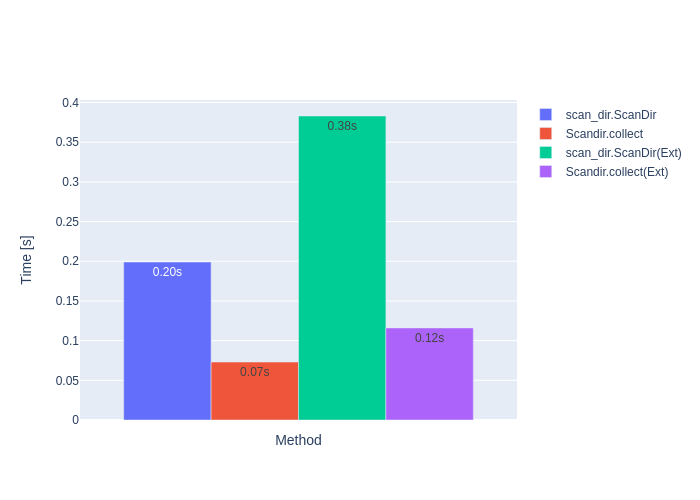
  <li><strong>Scandir</strong> is up to <strong>6.5× faster on both Linux and Windows</strong></li>
</ul>

<p>When processing millions of files, these speedups can turn minutes into seconds.</p>

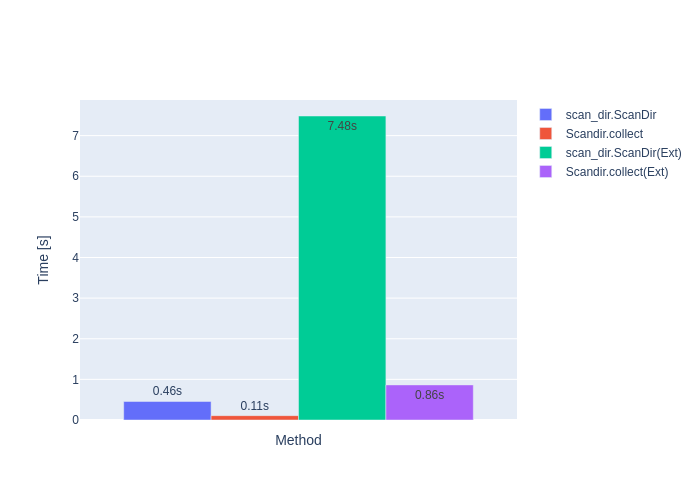
<h3 id="benchmarks-results-for-running-scandir-in-linux-59-folder">Benchmarks results for running scandir in linux-5.9 folder</h3>

<figure>
    <img src="https://raw.githubusercontent.com/brmmm3/scandir-rs/master/scandir/doc/images/linux_scandir_linux-5.9.png" width="48%" alt="scandir benchmarks" />
    <figcaption>scandir-rs Walk benchmark on Linux (kernel 5.9)</figcaption>
</figure>

<figure>
    <img src="https://raw.githubusercontent.com/brmmm3/scandir-rs/master/scandir/doc/images/windows_scandir_linux-5.9.png" width="48%" alt="scandir benchmarks" />
    <figcaption>scandir-rs Walk benchmark on Windows (kernel 5.9)</figcaption>
</figure>

<h3 id="-richer-metadata">🔍 Richer Metadata</h3>

<p>Beyond the standard <code class="language-plaintext highlighter-rouge">os.walk()</code> and <code class="language-plaintext highlighter-rouge">os.scandir()</code> APIs, scandir-rs can return:</p>

<ul>
  <li>Extended file metadata</li>
  <li>Hardlink detection</li>
  <li>Additional file type classification</li>
  <li>Error collection without interrupting traversal</li>
</ul>

<h3 id="-background-processing">⚡ Background Processing</h3>

<p>Long-running scans can run asynchronously in the background, allowing your application to process results while scanning is still in progress.</p>

<h2 id="installation">Installation</h2>

<div class="language-bash highlighter-rouge"><div class="highlight"><pre class="highlight"><code>pip <span class="nb">install </span>scandir-rs
</code></pre></div></div>

<h2 id="usage-examples">Usage Examples</h2>

<h3 id="directory-statistics">Directory Statistics</h3>

<p>Get fast statistics for an entire directory tree:</p>

<div class="language-python highlighter-rouge"><div class="highlight"><pre class="highlight"><code><span class="kn">import</span> <span class="nn">scandir_rs</span> <span class="k">as</span> <span class="n">scandir</span>

<span class="k">print</span><span class="p">(</span><span class="n">scandir</span><span class="p">.</span><span class="n">Count</span><span class="p">(</span><span class="s">"/usr"</span><span class="p">).</span><span class="n">collect</span><span class="p">())</span>
</code></pre></div></div>

<h3 id="extended-statistics">Extended Statistics</h3>

<p>Include additional metadata and hardlink detection:</p>

<div class="language-python highlighter-rouge"><div class="highlight"><pre class="highlight"><code><span class="kn">import</span> <span class="nn">scandir_rs</span> <span class="k">as</span> <span class="n">scandir</span>

<span class="k">print</span><span class="p">(</span>
    <span class="n">scandir</span><span class="p">.</span><span class="n">Count</span><span class="p">(</span>
        <span class="s">"/usr"</span><span class="p">,</span>
        <span class="n">return_type</span><span class="o">=</span><span class="n">scandir</span><span class="p">.</span><span class="n">ReturnType</span><span class="p">.</span><span class="n">Ext</span>
    <span class="p">).</span><span class="n">collect</span><span class="p">()</span>
<span class="p">)</span>
</code></pre></div></div>

<h3 id="background-scanning">Background Scanning</h3>

<p>Process results while scanning continues in the background:</p>

<div class="language-python highlighter-rouge"><div class="highlight"><pre class="highlight"><code><span class="kn">import</span> <span class="nn">scandir_rs</span> <span class="k">as</span> <span class="n">scandir</span>

<span class="n">counter</span> <span class="o">=</span> <span class="n">scandir</span><span class="p">.</span><span class="n">Count</span><span class="p">(</span><span class="s">"/usr"</span><span class="p">)</span>

<span class="k">with</span> <span class="n">counter</span><span class="p">:</span>
    <span class="k">while</span> <span class="n">counter</span><span class="p">.</span><span class="n">busy</span><span class="p">:</span>
        <span class="n">results</span> <span class="o">=</span> <span class="n">counter</span><span class="p">.</span><span class="n">results</span><span class="p">()</span>
        <span class="c1"># Process intermediate results
</span>
<span class="c1"># Final results as JSON
</span><span class="n">results</span> <span class="o">=</span> <span class="n">counter</span><span class="p">.</span><span class="n">to_json</span><span class="p">()</span>
</code></pre></div></div>

<h2 id="faster-oswalk">Faster <code class="language-plaintext highlighter-rouge">os.walk()</code></h2>

<p>A familiar interface with significantly better performance:</p>

<div class="language-python highlighter-rouge"><div class="highlight"><pre class="highlight"><code><span class="kn">import</span> <span class="nn">scandir_rs</span> <span class="k">as</span> <span class="n">scandir</span>

<span class="k">for</span> <span class="n">root</span><span class="p">,</span> <span class="n">dirs</span><span class="p">,</span> <span class="n">files</span> <span class="ow">in</span> <span class="n">scandir</span><span class="p">.</span><span class="n">Walk</span><span class="p">(</span><span class="s">"/usr"</span><span class="p">):</span>
    <span class="c1"># Process files
</span></code></pre></div></div>

<h3 id="extended-walk-information">Extended Walk Information</h3>

<p>Retrieve additional file categories and error information:</p>

<div class="language-python highlighter-rouge"><div class="highlight"><pre class="highlight"><code><span class="kn">import</span> <span class="nn">scandir_rs</span> <span class="k">as</span> <span class="n">scandir</span>

<span class="k">for</span> <span class="n">root</span><span class="p">,</span> <span class="n">dirs</span><span class="p">,</span> <span class="n">files</span><span class="p">,</span> <span class="n">symlinks</span><span class="p">,</span> <span class="n">other</span><span class="p">,</span> <span class="n">errors</span> <span class="ow">in</span> <span class="n">scandir</span><span class="p">.</span><span class="n">Walk</span><span class="p">(</span>
    <span class="s">"/usr"</span><span class="p">,</span>
    <span class="n">return_type</span><span class="o">=</span><span class="n">scandir</span><span class="p">.</span><span class="n">ReturnType</span><span class="p">.</span><span class="n">Ext</span>
<span class="p">):</span>
    <span class="c1"># Process files
</span></code></pre></div></div>

<p>On Unix systems, <code class="language-plaintext highlighter-rouge">other</code> includes special file types such as pipes and devices.</p>

<h2 id="faster-osscandir">Faster <code class="language-plaintext highlighter-rouge">os.scandir()</code></h2>

<p>Collect all entries at once:</p>

<div class="language-python highlighter-rouge"><div class="highlight"><pre class="highlight"><code><span class="kn">import</span> <span class="nn">scandir_rs</span> <span class="k">as</span> <span class="n">scandir</span>

<span class="n">entries</span><span class="p">,</span> <span class="n">errors</span> <span class="o">=</span> <span class="n">scandir</span><span class="p">.</span><span class="n">Scandir</span><span class="p">(</span><span class="s">"/usr"</span><span class="p">).</span><span class="n">collect</span><span class="p">()</span>
</code></pre></div></div>

<p>Or iterate lazily:</p>

<div class="language-python highlighter-rouge"><div class="highlight"><pre class="highlight"><code><span class="kn">import</span> <span class="nn">scandir_rs</span> <span class="k">as</span> <span class="n">scandir</span>

<span class="k">for</span> <span class="n">entry</span> <span class="ow">in</span> <span class="n">scandir</span><span class="p">.</span><span class="n">Scandir</span><span class="p">(</span><span class="s">"/usr"</span><span class="p">):</span>
    <span class="c1"># Process entry
</span></code></pre></div></div>

<h3 id="extended-metadata">Extended Metadata</h3>

<p>Request detailed information for each directory entry:</p>

<div class="language-python highlighter-rouge"><div class="highlight"><pre class="highlight"><code><span class="kn">import</span> <span class="nn">scandir_rs</span> <span class="k">as</span> <span class="n">scandir</span>

<span class="k">for</span> <span class="n">entry</span> <span class="ow">in</span> <span class="n">scandir</span><span class="p">.</span><span class="n">Scandir</span><span class="p">(</span>
    <span class="s">"/usr"</span><span class="p">,</span>
    <span class="n">return_type</span><span class="o">=</span><span class="n">scandir</span><span class="p">.</span><span class="n">ReturnType</span><span class="p">.</span><span class="n">Ext</span>
<span class="p">):</span>
    <span class="c1"># Process entry
</span></code></pre></div></div>

<p>Entries are returned as <code class="language-plaintext highlighter-rouge">DirEntryExt</code> objects. Errors are reported as tuples containing:</p>

<div class="language-python highlighter-rouge"><div class="highlight"><pre class="highlight"><code><span class="p">(</span><span class="n">relative_path</span><span class="p">,</span> <span class="n">error_message</span><span class="p">)</span>
</code></pre></div></div>

<p>allowing scans to continue even when individual files cannot be accessed.</p>

<h2 id="benchmark-results">Benchmark Results</h2>

<h3 id="walk-performance">Walk Performance</h3>

<table>
  <thead>
    <tr>
      <th>Operation</th>
      <th>Linux</th>
      <th>Windows</th>
    </tr>
  </thead>
  <tbody>
    <tr>
      <td><code class="language-plaintext highlighter-rouge">Walk</code> vs <code class="language-plaintext highlighter-rouge">os.walk</code></td>
      <td>Up to 13× faster</td>
      <td>Up to 70× faster</td>
    </tr>
  </tbody>
</table>

<h3 id="scandir-performance">Scandir Performance</h3>

<table>
  <thead>
    <tr>
      <th>Operation</th>
      <th>Linux</th>
      <th>Windows</th>
    </tr>
  </thead>
  <tbody>
    <tr>
      <td><code class="language-plaintext highlighter-rouge">Scandir</code> vs <code class="language-plaintext highlighter-rouge">os.scandir</code></td>
      <td>Up to 6.5× faster</td>
      <td>Up to 6.5× faster</td>
    </tr>
  </tbody>
</table>

<p>For detailed benchmark data and methodology, see the benchmark documentation:</p>

<p><a href="https://github.com/brmmm3/scandir-rs/blob/master/pyscandir/doc/benchmarks.md">https://github.com/brmmm3/scandir-rs/blob/master/pyscandir/doc/benchmarks.md</a></p>

<h2 id="get-started">Get Started</h2>

<p>If your application spends time traversing large directory trees, scandir-rs can provide substantial performance improvements with minimal code changes.</p>

<p>The API is intentionally familiar, making migration from <code class="language-plaintext highlighter-rouge">os.walk()</code> and <code class="language-plaintext highlighter-rouge">os.scandir()</code> straightforward
while unlocking additional capabilities and significantly faster execution.</p>

<p>Source code, documentation, and issue tracker:</p>

<p><a href="https://github.com/brmmm3/scandir-rs">https://github.com/brmmm3/scandir-rs</a></p>

<p>Licensed under the MIT License.</p>]]></content><author><name>Marty B.</name></author><summary type="html"><![CDATA[]]></summary></entry><entry><title type="html">scandir-rs</title><link href="https://brmmm3.github.io/posts/2024/04/21/scandir-rs/" rel="alternate" type="text/html" title="scandir-rs" /><published>2024-04-21T10:40:00+00:00</published><updated>2024-04-21T10:40:00+00:00</updated><id>https://brmmm3.github.io/posts/2024/04/21/scandir-rs</id><content type="html" xml:base="https://brmmm3.github.io/posts/2024/04/21/scandir-rs/"><![CDATA[<p>Because speed matters…</p>

<p>I’ve released a new version of <a href="https://pypi.org/project/scandir-rs/">scandir_rs</a> with better performance and some small improvements.</p>

<p>The API is a bit different and provides more features. But it should be easy to replace <code class="language-plaintext highlighter-rouge">os.walk</code> and <code class="language-plaintext highlighter-rouge">os.scandir</code> with <code class="language-plaintext highlighter-rouge">scandir-rs</code>.</p>

<h2 id="usage-examples">Usage examples</h2>

<p>Get statistics of a directory:</p>

<div class="language-python highlighter-rouge"><div class="highlight"><pre class="highlight"><code><span class="kn">import</span> <span class="nn">scandir_rs</span> <span class="k">as</span> <span class="n">scandir</span>

<span class="k">print</span><span class="p">(</span><span class="n">scandir</span><span class="p">.</span><span class="n">Count</span><span class="p">(</span><span class="s">"/usr"</span><span class="p">).</span><span class="n">collect</span><span class="p">())</span>
</code></pre></div></div>

<p>Get extended statistics (also identify hardlinks) of a directory:</p>

<div class="language-python highlighter-rouge"><div class="highlight"><pre class="highlight"><code><span class="kn">import</span> <span class="nn">scandir_rs</span> <span class="k">as</span> <span class="n">scandir</span>

<span class="k">print</span><span class="p">(</span><span class="n">scandir</span><span class="p">.</span><span class="n">Count</span><span class="p">(</span><span class="s">"/usr"</span><span class="p">,</span> <span class="n">return_Type</span><span class="o">=</span><span class="n">scandir</span><span class="p">.</span><span class="n">ReturnType</span><span class="p">.</span><span class="n">Ext</span><span class="p">).</span><span class="n">collect</span><span class="p">())</span>
</code></pre></div></div>

<p>The same, but asynchronously in background using a class instance and a context manager:</p>

<div class="language-python highlighter-rouge"><div class="highlight"><pre class="highlight"><code><span class="kn">import</span> <span class="nn">scandir_rs</span> <span class="k">as</span> <span class="n">scandir</span>

<span class="n">C</span> <span class="o">=</span> <span class="n">scandir</span><span class="p">.</span><span class="n">Count</span><span class="p">(</span><span class="s">"/usr"</span><span class="p">)</span>
<span class="k">with</span> <span class="n">C</span><span class="p">:</span>
    <span class="k">while</span> <span class="n">C</span><span class="p">.</span><span class="n">busy</span><span class="p">:</span>
        <span class="n">results</span> <span class="o">=</span> <span class="n">C</span><span class="p">.</span><span class="n">results</span><span class="p">()</span>
        <span class="c1"># Do something
# Get final results as JSON
</span><span class="n">results</span> <span class="o">=</span> <span class="n">C</span><span class="p">.</span><span class="n">to_json</span><span class="p">()</span>
</code></pre></div></div>

<p><code class="language-plaintext highlighter-rouge">os.walk()</code> examples:</p>

<div class="language-python highlighter-rouge"><div class="highlight"><pre class="highlight"><code><span class="kn">import</span> <span class="nn">scandir_rs</span> <span class="k">as</span> <span class="n">scandir</span>

<span class="k">for</span> <span class="n">root</span><span class="p">,</span> <span class="n">dirs</span><span class="p">,</span> <span class="n">files</span> <span class="ow">in</span> <span class="n">scandir</span><span class="p">.</span><span class="n">Walk</span><span class="p">(</span><span class="s">"/usr"</span><span class="p">):</span>
    <span class="c1"># Do something
</span></code></pre></div></div>

<p>Or get extended file types (On Unix <code class="language-plaintext highlighter-rouge">other</code> contains pipes and devices):</p>

<div class="language-python highlighter-rouge"><div class="highlight"><pre class="highlight"><code><span class="kn">import</span> <span class="nn">scandir_rs</span> <span class="k">as</span> <span class="n">scandir</span>

<span class="k">for</span> <span class="n">root</span><span class="p">,</span> <span class="n">dirs</span><span class="p">,</span> <span class="n">files</span><span class="p">,</span> <span class="n">symlinks</span><span class="p">,</span> <span class="n">other</span><span class="p">,</span> <span class="n">errors</span> <span class="ow">in</span> <span class="n">scandir</span><span class="p">.</span><span class="n">Walk</span><span class="p">(</span><span class="s">"/usr"</span><span class="p">,</span> <span class="n">return_type</span><span class="o">=</span><span class="n">ReturnType</span><span class="p">.</span><span class="n">Ext</span><span class="p">):</span>
    <span class="c1"># Do something
</span></code></pre></div></div>

<p><code class="language-plaintext highlighter-rouge">os.scandir()</code> example:</p>

<div class="language-python highlighter-rouge"><div class="highlight"><pre class="highlight"><code><span class="kn">import</span> <span class="nn">scandir_rs</span> <span class="k">as</span> <span class="n">scandir</span>

<span class="n">entries</span><span class="p">,</span> <span class="n">errors</span> <span class="o">=</span> <span class="n">scandir</span><span class="p">.</span><span class="n">Scandir</span><span class="p">(</span><span class="s">"/usr"</span><span class="p">).</span><span class="n">collect</span><span class="p">()</span>
</code></pre></div></div>

<p>Or iterate through entries (<code class="language-plaintext highlighter-rouge">entry</code> is of type <code class="language-plaintext highlighter-rouge">DirEntry</code> or in case of an error a tuple with 2 strings. First string is the relative path and the second string the error message):</p>

<div class="language-python highlighter-rouge"><div class="highlight"><pre class="highlight"><code><span class="kn">import</span> <span class="nn">scandir_rs</span> <span class="k">as</span> <span class="n">scandir</span>

<span class="k">for</span> <span class="n">entry</span> <span class="ow">in</span> <span class="n">scandir</span><span class="p">.</span><span class="n">Scandir</span><span class="p">(</span><span class="s">"/usr"</span><span class="p">):</span>
    <span class="c1"># Do something
</span></code></pre></div></div>

<p>Or with extended metadata (<code class="language-plaintext highlighter-rouge">entry</code> is of type <code class="language-plaintext highlighter-rouge">DirEntryExt</code> or in case of an error a tuple with 2 strings):</p>

<div class="language-python highlighter-rouge"><div class="highlight"><pre class="highlight"><code><span class="kn">import</span> <span class="nn">scandir_rs</span> <span class="k">as</span> <span class="n">scandir</span>

<span class="k">for</span> <span class="n">entry</span> <span class="ow">in</span> <span class="n">scandir</span><span class="p">.</span><span class="n">Scandir</span><span class="p">(</span><span class="s">"/usr"</span><span class="p">,</span> <span class="n">return_type</span><span class="o">=</span><span class="n">ReturnType</span><span class="p">.</span><span class="n">Ext</span><span class="p">):</span>
    <span class="c1"># Do something
</span></code></pre></div></div>

<h2 id="benchmarks">Benchmarks</h2>

<p>On Linux <code class="language-plaintext highlighter-rouge">Walk</code> is up to 13 times faster than <code class="language-plaintext highlighter-rouge">os.walk</code> and on Windows up to 70 times faster.<br />
On Linux and on Windows <code class="language-plaintext highlighter-rouge">Scandir</code> is up to 6.5 times faster than <code class="language-plaintext highlighter-rouge">os.scandir</code>.</p>

<p>For detailed benchmarks see <a href="https://github.com/brmmm3/scandir-rs/blob/master/pyscandir/doc/benchmarks.md">here</a></p>

<p>Check out the <a href="https://github.com/brmmm3/scandir-rs">scandir-rs</a> module on github, licensed under the MIT license.</p>]]></content><author><name>Marty B.</name></author><category term="posts" /><summary type="html"><![CDATA[Because speed matters…]]></summary></entry><entry><title type="html">A socketserver with threads vs uvloop</title><link href="https://brmmm3.github.io/posts/2020/01/10/socketserver_threads_vs_uvloop/" rel="alternate" type="text/html" title="A socketserver with threads vs uvloop" /><published>2020-01-10T10:47:37+00:00</published><updated>2020-01-10T10:47:37+00:00</updated><id>https://brmmm3.github.io/posts/2020/01/10/socketserver_threads_vs_uvloop</id><content type="html" xml:base="https://brmmm3.github.io/posts/2020/01/10/socketserver_threads_vs_uvloop/"><![CDATA[<p>The <code class="language-plaintext highlighter-rouge">uvloop</code> project is great with an amazing performance, and a good replacement for the default asyncio module, if Linux is used. Unfortunately <code class="language-plaintext highlighter-rouge">uvloop</code> is not available for Windows.</p>

<p>Just for interest I wanted to know how a multi threaded version competes with the <code class="language-plaintext highlighter-rouge">uvloop</code>, which is single threaded.
Is a comparable performance possible, or is a solution with multiple threads even faster?</p>

<p>So I took the echoserver.py example from the <code class="language-plaintext highlighter-rouge">uvloop</code> project and extended it with support for <code class="language-plaintext highlighter-rouge">fastthreadpool</code>.</p>

<p>Here is a simplified code example of a socket server with <code class="language-plaintext highlighter-rouge">fastthreadpool</code>:</p>

<div class="language-python highlighter-rouge"><div class="highlight"><pre class="highlight"><code><span class="k">def</span> <span class="nf">pool_echo_server</span><span class="p">(</span><span class="n">address</span><span class="p">,</span> <span class="n">threads</span><span class="p">,</span> <span class="n">size</span><span class="p">):</span>
    <span class="n">sock</span> <span class="o">=</span> <span class="n">socket</span><span class="p">(</span><span class="n">AF_INET</span><span class="p">,</span> <span class="n">SOCK_STREAM</span><span class="p">)</span>
    <span class="n">sock</span><span class="p">.</span><span class="n">setsockopt</span><span class="p">(</span><span class="n">SOL_SOCKET</span><span class="p">,</span> <span class="n">SO_REUSEADDR</span><span class="p">,</span> <span class="mi">1</span><span class="p">)</span>
    <span class="n">sock</span><span class="p">.</span><span class="n">bind</span><span class="p">(</span><span class="n">address</span><span class="p">)</span>
    <span class="n">sock</span><span class="p">.</span><span class="n">listen</span><span class="p">(</span><span class="n">threads</span><span class="p">)</span>
    <span class="k">with</span> <span class="n">sock</span><span class="p">:</span>
        <span class="k">while</span> <span class="bp">True</span><span class="p">:</span>
            <span class="n">client</span><span class="p">,</span> <span class="n">addr</span> <span class="o">=</span> <span class="n">sock</span><span class="p">.</span><span class="n">accept</span><span class="p">()</span>
            <span class="n">pool</span><span class="p">.</span><span class="n">submit</span><span class="p">(</span><span class="n">pool_echo_client</span><span class="p">,</span> <span class="n">client</span><span class="p">,</span> <span class="n">size</span><span class="p">)</span>

<span class="k">def</span> <span class="nf">pool_echo_client</span><span class="p">(</span><span class="n">client</span><span class="p">,</span> <span class="n">size</span><span class="p">):</span>
    <span class="n">client</span><span class="p">.</span><span class="n">setsockopt</span><span class="p">(</span><span class="n">IPPROTO_TCP</span><span class="p">,</span> <span class="n">TCP_NODELAY</span><span class="p">,</span> <span class="mi">1</span><span class="p">)</span>
    <span class="n">b</span> <span class="o">=</span> <span class="nb">bytearray</span><span class="p">(</span><span class="n">size</span><span class="p">)</span>
    <span class="n">bl</span> <span class="o">=</span> <span class="p">[</span> <span class="n">b</span> <span class="p">]</span>
    <span class="k">with</span> <span class="n">client</span><span class="p">:</span>
        <span class="k">try</span><span class="p">:</span>
            <span class="k">while</span> <span class="bp">True</span><span class="p">:</span>
                <span class="n">client</span><span class="p">.</span><span class="n">recvmsg_into</span><span class="p">(</span><span class="n">bl</span><span class="p">)</span>
                <span class="n">client</span><span class="p">.</span><span class="n">sendall</span><span class="p">(</span><span class="n">b</span><span class="p">)</span>
        <span class="k">except</span><span class="p">:</span>
            <span class="k">pass</span>

<span class="n">pool</span> <span class="o">=</span> <span class="n">fastthreadpool</span><span class="p">.</span><span class="n">Pool</span><span class="p">(</span><span class="mi">8</span><span class="p">)</span>
<span class="n">pool</span><span class="p">.</span><span class="n">submit</span><span class="p">(</span><span class="n">pool_echo_server</span><span class="p">,</span> <span class="n">addr</span><span class="p">,</span> <span class="mi">8</span><span class="p">,</span> <span class="mi">4096</span><span class="p">)</span>
<span class="n">pool</span><span class="p">.</span><span class="n">join</span><span class="p">()</span>
</code></pre></div></div>

<p>For a complete example please have a look into the examples/bench directory.</p>

<p>Folowing benchmarks were executed on a Ryzen 7 with Linux Mint 18.3, kernel 4.13.0-37-generic and Python 3.6. echoserver.py and echoclient.py were executed on the same machine.
echoclient.py was always run with 5 parallel workers. Only the message size was modified for the different tests. I’ve only compared <code class="language-plaintext highlighter-rouge">uvloop</code> using simple protocol with the multi threaded version.</p>

<table>
  <thead>
    <tr>
      <th>Module</th>
      <th style="text-align: center">Server buffer size</th>
      <th style="text-align: center">Message size</th>
      <th style="text-align: center">Messages/s</th>
      <th style="text-align: center">MB/s</th>
    </tr>
  </thead>
  <tbody>
    <tr>
      <td>uvloop</td>
      <td style="text-align: center"> </td>
      <td style="text-align: center">1000 bytes</td>
      <td style="text-align: center">128220</td>
      <td style="text-align: center">122,28</td>
    </tr>
    <tr>
      <td>uvloop</td>
      <td style="text-align: center"> </td>
      <td style="text-align: center">4kB</td>
      <td style="text-align: center">108581</td>
      <td style="text-align: center">424,14</td>
    </tr>
    <tr>
      <td>uvloop</td>
      <td style="text-align: center"> </td>
      <td style="text-align: center">64kB</td>
      <td style="text-align: center">26004</td>
      <td style="text-align: center"><strong>1625,25</strong></td>
    </tr>
    <tr>
      <td>threads</td>
      <td style="text-align: center">4kB</td>
      <td style="text-align: center">1000 bytes</td>
      <td style="text-align: center">423226</td>
      <td style="text-align: center">403,62</td>
    </tr>
    <tr>
      <td>threads</td>
      <td style="text-align: center">4kB</td>
      <td style="text-align: center">4kB</td>
      <td style="text-align: center">112033</td>
      <td style="text-align: center">437,63</td>
    </tr>
    <tr>
      <td>threads</td>
      <td style="text-align: center">8kB</td>
      <td style="text-align: center">4kB</td>
      <td style="text-align: center">256438</td>
      <td style="text-align: center">1001,71</td>
    </tr>
    <tr>
      <td>threads</td>
      <td style="text-align: center">16kB</td>
      <td style="text-align: center">4kB</td>
      <td style="text-align: center">381320</td>
      <td style="text-align: center">1489,53</td>
    </tr>
    <tr>
      <td>threads</td>
      <td style="text-align: center">4kB</td>
      <td style="text-align: center">64kB</td>
      <td style="text-align: center">6690</td>
      <td style="text-align: center">418,13</td>
    </tr>
    <tr>
      <td>threads</td>
      <td style="text-align: center">64kB</td>
      <td style="text-align: center">64kB</td>
      <td style="text-align: center">66672</td>
      <td style="text-align: center"><strong>4167</strong></td>
    </tr>
    <tr>
      <td>threads</td>
      <td style="text-align: center">128kB</td>
      <td style="text-align: center">64kB</td>
      <td style="text-align: center">62236</td>
      <td style="text-align: center">3889,75</td>
    </tr>
    <tr>
      <td>threads</td>
      <td style="text-align: center">256kB</td>
      <td style="text-align: center">64kB</td>
      <td style="text-align: center">60292</td>
      <td style="text-align: center">3768,25</td>
    </tr>
  </tbody>
</table>

<p>Folowing benchmarks were executed on a Core i5-8250U with Linux Mint 18.3, kernel 5.2.3-050203-generic and Python 3.7.2. echoserver.py and echoclient.py were executed on the same machine.
echoclient.py was always run with 5 parallel workers. Only the message size was modified for the different tests.</p>

<table>
  <thead>
    <tr>
      <th>Module</th>
      <th style="text-align: center">Server buffer size</th>
      <th style="text-align: center">Message size</th>
      <th style="text-align: center">Messages/s</th>
      <th style="text-align: center">MB/s</th>
    </tr>
  </thead>
  <tbody>
    <tr>
      <td>uvloop</td>
      <td style="text-align: center"> </td>
      <td style="text-align: center">1000 bytes</td>
      <td style="text-align: center">34628</td>
      <td style="text-align: center">33,21</td>
    </tr>
    <tr>
      <td>uvloop</td>
      <td style="text-align: center"> </td>
      <td style="text-align: center">4kB</td>
      <td style="text-align: center">35975</td>
      <td style="text-align: center">140,53</td>
    </tr>
    <tr>
      <td>uvloop</td>
      <td style="text-align: center"> </td>
      <td style="text-align: center">64kB</td>
      <td style="text-align: center">2170</td>
      <td style="text-align: center">135,68</td>
    </tr>
    <tr>
      <td>uvloop/streams</td>
      <td style="text-align: center"> </td>
      <td style="text-align: center">1000 bytes</td>
      <td style="text-align: center">65588</td>
      <td style="text-align: center">62,55</td>
    </tr>
    <tr>
      <td>uvloop/streams</td>
      <td style="text-align: center"> </td>
      <td style="text-align: center">4kB</td>
      <td style="text-align: center">61856</td>
      <td style="text-align: center">241,63</td>
    </tr>
    <tr>
      <td>uvloop/streams</td>
      <td style="text-align: center"> </td>
      <td style="text-align: center">64kB</td>
      <td style="text-align: center"> </td>
      <td style="text-align: center"><strong>1625,25</strong></td>
    </tr>
    <tr>
      <td>uvloop/protocol</td>
      <td style="text-align: center"> </td>
      <td style="text-align: center">1000 bytes</td>
      <td style="text-align: center">34628</td>
      <td style="text-align: center">33,21</td>
    </tr>
    <tr>
      <td>uvloop/protocol</td>
      <td style="text-align: center"> </td>
      <td style="text-align: center">4kB</td>
      <td style="text-align: center">35975</td>
      <td style="text-align: center">140,53</td>
    </tr>
    <tr>
      <td>uvloop/protocol</td>
      <td style="text-align: center"> </td>
      <td style="text-align: center">64kB</td>
      <td style="text-align: center">26004</td>
      <td style="text-align: center"><strong>1625,25</strong></td>
    </tr>
    <tr>
      <td>asyncio</td>
      <td style="text-align: center"> </td>
      <td style="text-align: center">1000 bytes</td>
      <td style="text-align: center">128220</td>
      <td style="text-align: center">122,28</td>
    </tr>
    <tr>
      <td>asyncio</td>
      <td style="text-align: center"> </td>
      <td style="text-align: center">4kB</td>
      <td style="text-align: center">108581</td>
      <td style="text-align: center">424,14</td>
    </tr>
    <tr>
      <td>asyncio</td>
      <td style="text-align: center"> </td>
      <td style="text-align: center">64kB</td>
      <td style="text-align: center">26004</td>
      <td style="text-align: center"><strong>1625,25</strong></td>
    </tr>
    <tr>
      <td>asyncio/streams</td>
      <td style="text-align: center"> </td>
      <td style="text-align: center">4kB</td>
      <td style="text-align: center">108581</td>
      <td style="text-align: center">424,14</td>
    </tr>
    <tr>
      <td>asyncio/streams</td>
      <td style="text-align: center"> </td>
      <td style="text-align: center">4kB</td>
      <td style="text-align: center">108581</td>
      <td style="text-align: center">424,14</td>
    </tr>
    <tr>
      <td>asyncio/streams</td>
      <td style="text-align: center"> </td>
      <td style="text-align: center">64kB</td>
      <td style="text-align: center">26004</td>
      <td style="text-align: center"><strong>1625,25</strong></td>
    </tr>
    <tr>
      <td>asyncio/protocol</td>
      <td style="text-align: center"> </td>
      <td style="text-align: center">64kB</td>
      <td style="text-align: center">26004</td>
      <td style="text-align: center"><strong>1625,25</strong></td>
    </tr>
    <tr>
      <td>asyncio/protocol</td>
      <td style="text-align: center"> </td>
      <td style="text-align: center">4kB</td>
      <td style="text-align: center">108581</td>
      <td style="text-align: center">424,14</td>
    </tr>
    <tr>
      <td>asyncio/protocol</td>
      <td style="text-align: center"> </td>
      <td style="text-align: center">64kB</td>
      <td style="text-align: center">26004</td>
      <td style="text-align: center"><strong>1625,25</strong></td>
    </tr>
    <tr>
      <td>threads</td>
      <td style="text-align: center">4kB</td>
      <td style="text-align: center">1000 bytes</td>
      <td style="text-align: center">423226</td>
      <td style="text-align: center">403,62</td>
    </tr>
    <tr>
      <td>threads</td>
      <td style="text-align: center">4kB</td>
      <td style="text-align: center">4kB</td>
      <td style="text-align: center">112033</td>
      <td style="text-align: center">437,63</td>
    </tr>
    <tr>
      <td>threads</td>
      <td style="text-align: center">8kB</td>
      <td style="text-align: center">4kB</td>
      <td style="text-align: center">256438</td>
      <td style="text-align: center">1001,71</td>
    </tr>
    <tr>
      <td>threads</td>
      <td style="text-align: center">16kB</td>
      <td style="text-align: center">4kB</td>
      <td style="text-align: center">381320</td>
      <td style="text-align: center">1489,53</td>
    </tr>
    <tr>
      <td>threads</td>
      <td style="text-align: center">4kB</td>
      <td style="text-align: center">64kB</td>
      <td style="text-align: center">6690</td>
      <td style="text-align: center">418,13</td>
    </tr>
    <tr>
      <td>threads</td>
      <td style="text-align: center">64kB</td>
      <td style="text-align: center">64kB</td>
      <td style="text-align: center">66672</td>
      <td style="text-align: center"><strong>4167</strong></td>
    </tr>
    <tr>
      <td>threads</td>
      <td style="text-align: center">128kB</td>
      <td style="text-align: center">64kB</td>
      <td style="text-align: center">62236</td>
      <td style="text-align: center">3889,75</td>
    </tr>
    <tr>
      <td>threads</td>
      <td style="text-align: center">256kB</td>
      <td style="text-align: center">64kB</td>
      <td style="text-align: center">60292</td>
      <td style="text-align: center">3768,25</td>
    </tr>
  </tbody>
</table>

<p>The results show clearly that the multi threaded version performs much better if the buffer size on the server side is adjusted perfectly depending on the message size. The magic why the multi threaded example is so fast is that it uses recvmsg_into which writes the received data into a preallocated buffer.</p>]]></content><author><name>Marty B.</name></author><category term="posts" /><summary type="html"><![CDATA[The uvloop project is great with an amazing performance, and a good replacement for the default asyncio module, if Linux is used. Unfortunately uvloop is not available for Windows.]]></summary></entry><entry><title type="html">scandir-rs</title><link href="https://brmmm3.github.io/posts/2020/01/10/scandir-rs/" rel="alternate" type="text/html" title="scandir-rs" /><published>2020-01-10T10:40:00+00:00</published><updated>2020-01-10T10:40:00+00:00</updated><id>https://brmmm3.github.io/posts/2020/01/10/scandir-rs</id><content type="html" xml:base="https://brmmm3.github.io/posts/2020/01/10/scandir-rs/"><![CDATA[<p>Because speed matters…</p>

<p>With the increased speed of SSDs single threaded file access does not always fully utilize the disk. The bottleneck more and more is the CPU itself.</p>

<p>When I started learning the great new language Rust I came across a crate called jwalk. This crate does directory scanning in parallel with a thread pool. The benchmarks are amazing. So I thought I write a Python module as a faster alternative to os.walk which uses jwalk. The result is the new module scandir-rs which can be found on pypi.org.</p>

<p>The API is a bit different and provides more features. But it should be easy to replace os.walk and os.scandir with scandir-rs.</p>

<h2 id="usage-examples">Usage examples</h2>

<p>Get statistics of a directory:</p>

<div class="language-python highlighter-rouge"><div class="highlight"><pre class="highlight"><code><span class="kn">import</span> <span class="nn">scandir_rs</span> <span class="k">as</span> <span class="n">scandir</span>
<span class="k">print</span><span class="p">(</span><span class="n">scandir</span><span class="p">.</span><span class="n">count</span><span class="p">.</span><span class="n">count</span><span class="p">(</span><span class="s">"~/workspace"</span><span class="p">,</span> <span class="n">metadata_ext</span><span class="o">=</span><span class="bp">True</span><span class="p">))</span>
</code></pre></div></div>

<p>The same, but asynchronously in background using a class instance and a context manager:</p>

<div class="language-python highlighter-rouge"><div class="highlight"><pre class="highlight"><code><span class="kn">import</span> <span class="nn">scandir_rs</span> <span class="k">as</span> <span class="n">scandir</span>
<span class="n">C</span> <span class="o">=</span> <span class="n">scandir</span><span class="p">.</span><span class="n">count</span><span class="p">.</span><span class="n">Count</span><span class="p">(</span><span class="s">"~/workspace"</span><span class="p">,</span> <span class="n">metadata_ext</span><span class="o">=</span><span class="bp">True</span><span class="p">))</span>
<span class="k">with</span> <span class="n">C</span><span class="p">:</span>
    <span class="k">while</span> <span class="n">C</span><span class="p">.</span><span class="n">busy</span><span class="p">():</span>
        <span class="n">statistics</span> <span class="o">=</span> <span class="n">C</span><span class="p">.</span><span class="n">statistics</span>
        <span class="c1"># Do something
</span></code></pre></div></div>

<p><code class="language-plaintext highlighter-rouge">os.walk()</code> example:</p>

<div class="language-python highlighter-rouge"><div class="highlight"><pre class="highlight"><code><span class="kn">import</span> <span class="nn">scandir_rs</span> <span class="k">as</span> <span class="n">scandir</span>
<span class="k">for</span> <span class="n">root</span><span class="p">,</span> <span class="n">dirs</span><span class="p">,</span> <span class="n">files</span> <span class="ow">in</span> <span class="n">scandir</span><span class="p">.</span><span class="n">walk</span><span class="p">.</span><span class="n">Walk</span><span class="p">(</span><span class="s">"~/workspace"</span><span class="p">,</span> <span class="n">iter_type</span><span class="o">=</span><span class="n">scandir</span><span class="p">.</span><span class="n">ITER_TYPE_WALK</span><span class="p">):</span>
    <span class="c1"># Do something
</span></code></pre></div></div>

<p><code class="language-plaintext highlighter-rouge">os.scandir()</code> example:</p>

<div class="language-python highlighter-rouge"><div class="highlight"><pre class="highlight"><code><span class="kn">import</span> <span class="nn">scandir_rs</span> <span class="k">as</span> <span class="n">scandir</span>
<span class="k">for</span> <span class="n">entry</span> <span class="ow">in</span> <span class="n">scandir</span><span class="p">.</span><span class="n">scandir</span><span class="p">.</span><span class="n">Scandir</span><span class="p">(</span><span class="s">"~/workspace"</span><span class="p">,</span> <span class="n">metadata_ext</span><span class="o">=</span><span class="bp">True</span><span class="p">):</span>
    <span class="c1"># Do something
</span></code></pre></div></div>

<h2 id="benchmarks">Benchmarks</h2>

<p>Now let’s have a look at some benchmarks. In the below table the line <strong>scandir_rs.walk.Walk</strong> returns comparable results to <code class="language-plaintext highlighter-rouge">os.walk</code>.</p>

<h3 id="linux-with-ryzen-5-2400g-and-ssd">Linux with Ryzen 5 2400G and SSD</h3>

<h4 id="directory-workspace-with">Directory <em>~/workspace</em> with</h4>

<ul>
  <li>22845 directories</li>
  <li>321354 files</li>
  <li>130 symlinks</li>
  <li>22849 hardlinks</li>
  <li>4 devices</li>
  <li>1 pipes</li>
  <li>4.6GB size and 5.4GB usage on disk</li>
</ul>

<table>
  <thead>
    <tr>
      <th>Time [s]</th>
      <th>Method</th>
    </tr>
  </thead>
  <tbody>
    <tr>
      <td>0.547</td>
      <td>os.walk (Python 3.7)</td>
    </tr>
    <tr>
      <td>0.132</td>
      <td>scandir_rs.count.count</td>
    </tr>
    <tr>
      <td>0.142</td>
      <td>scandir_rs.count.Count</td>
    </tr>
    <tr>
      <td>0.237</td>
      <td>scandir_rs.walk.Walk</td>
    </tr>
    <tr>
      <td>0.224</td>
      <td>scandir_rs.walk.toc</td>
    </tr>
    <tr>
      <td>0.242</td>
      <td>scandir_rs.walk.collect</td>
    </tr>
    <tr>
      <td>0.262</td>
      <td>scandir_rs.scandir.entries</td>
    </tr>
    <tr>
      <td>0.344</td>
      <td>scandir_rs.scandir.entries(metadata=True)</td>
    </tr>
    <tr>
      <td>0.336</td>
      <td>scandir_rs.scandir.entries(metadata_ext=True)</td>
    </tr>
    <tr>
      <td>0.280</td>
      <td>scandir_rs.scandir.Scandir.collect</td>
    </tr>
    <tr>
      <td>0.262</td>
      <td>scandir_rs.scandir.Scandir.iter</td>
    </tr>
    <tr>
      <td>0.330</td>
      <td>scandir_rs.scandir.Scandir.iter(metadata_ext=True)</td>
    </tr>
  </tbody>
</table>

<p>Up to <strong>2 times faster</strong> on Linux.</p>

<h3 id="windows-10-with-laptop-core-i7-4810mq--28ghz-laptop-mtf-ssd">Windows 10 with Laptop Core i7-4810MQ @ 2.8GHz Laptop, MTF SSD</h3>

<h4 id="directory-cwindows-with">Directory <em>C:\Windows</em> with</h4>

<ul>
  <li>84248 directories</li>
  <li>293108 files</li>
  <li>44.4GB size and 45.2GB usage on disk</li>
</ul>

<table>
  <thead>
    <tr>
      <th>Time [s]</th>
      <th>Method</th>
    </tr>
  </thead>
  <tbody>
    <tr>
      <td>26.881</td>
      <td>os.walk (Python 3.7)</td>
    </tr>
    <tr>
      <td>4.094</td>
      <td>scandir_rs.count.count</td>
    </tr>
    <tr>
      <td>3.654</td>
      <td>scandir_rs.count.Count</td>
    </tr>
    <tr>
      <td>3.978</td>
      <td>scandir_rs.walk.Walk</td>
    </tr>
    <tr>
      <td>3.848</td>
      <td>scandir_rs.walk.toc</td>
    </tr>
    <tr>
      <td>3.777</td>
      <td>scandir_rs.walk.collect</td>
    </tr>
    <tr>
      <td>3.987</td>
      <td>scandir_rs.scandir.entries</td>
    </tr>
    <tr>
      <td>3.905</td>
      <td>scandir_rs.scandir.entries(metadata=True)</td>
    </tr>
    <tr>
      <td>4.062</td>
      <td>scandir_rs.scandir.entries(metadata_ext=True)</td>
    </tr>
    <tr>
      <td>3.934</td>
      <td>scandir_rs.scandir.Scandir.collect</td>
    </tr>
    <tr>
      <td>3.981</td>
      <td>scandir_rs.scandir.Scandir.iter</td>
    </tr>
    <tr>
      <td>3.821</td>
      <td>scandir_rs.scandir.Scandir.iter(metadata_ext=True)</td>
    </tr>
  </tbody>
</table>

<p>Up to <strong>6.7 times faster</strong> on Windows 10.</p>

<h4 id="directory-ctestdir-with">Directory <em>C:\testdir</em> with</h4>

<ul>
  <li>185563 directories</li>
  <li>1641277 files</li>
  <li>2696 symlinks</li>
  <li>97GB size and 100.5GB usage on disk</li>
</ul>

<table>
  <thead>
    <tr>
      <th>Time [s]</th>
      <th>Method</th>
    </tr>
  </thead>
  <tbody>
    <tr>
      <td>151.143</td>
      <td>os.walk (Python 3.7)</td>
    </tr>
    <tr>
      <td>7.549</td>
      <td>scandir_rs.count.count</td>
    </tr>
    <tr>
      <td>7.531</td>
      <td>scandir_rs.count.Count</td>
    </tr>
    <tr>
      <td>8.710</td>
      <td>scandir_rs.walk.Walk</td>
    </tr>
    <tr>
      <td>8.625</td>
      <td>scandir_rs.walk.toc</td>
    </tr>
    <tr>
      <td>8.599</td>
      <td>scandir_rs.walk.collect</td>
    </tr>
    <tr>
      <td>9.014</td>
      <td>scandir_rs.scandir.entries</td>
    </tr>
    <tr>
      <td>9.208</td>
      <td>scandir_rs.scandir.entries(metadata=True)</td>
    </tr>
    <tr>
      <td>8.925</td>
      <td>scandir_rs.scandir.entries(metadata_ext=True)</td>
    </tr>
    <tr>
      <td>9.243</td>
      <td>scandir_rs.scandir.Scandir.collect</td>
    </tr>
    <tr>
      <td>8.462</td>
      <td>scandir_rs.scandir.Scandir.iter</td>
    </tr>
    <tr>
      <td>8.380</td>
      <td>scandir_rs.scandir.Scandir.iter(metadata_ext=True)</td>
    </tr>
  </tbody>
</table>

<p>Up to <strong>17.4 times faster</strong> on Windows 10.</p>

<p>Check out the <a href="https://github.com/brmmm3/scandir-rs">scandir-rs</a> module on github, licensed under the MIT license.</p>]]></content><author><name>Marty B.</name></author><category term="posts" /><summary type="html"><![CDATA[Because speed matters…]]></summary></entry><entry><title type="html">Python and Lua</title><link href="https://brmmm3.github.io/posts/2019/07/28/python_and_lua/" rel="alternate" type="text/html" title="Python and Lua" /><published>2019-07-28T10:20:37+00:00</published><updated>2019-07-28T10:20:37+00:00</updated><id>https://brmmm3.github.io/posts/2019/07/28/python_and_lua</id><content type="html" xml:base="https://brmmm3.github.io/posts/2019/07/28/python_and_lua/"><![CDATA[<p>Python is great, but pure Python code sometimes has one problem: It’s slow.</p>

<p>Fortunately there are several great solutions to improve the performance, like Numpy, Cython, Numba, Pypy.</p>

<p>All of the above solutions have different drawbacks:</p>

<p>Numpy and Numba are big modules. In addition Numpy is not always fast enough.
Pypy is not 100% compatible and a heavy solution if it is used in addition to CPython.
Cython is complex and you need a C-compiler.
Recently I’ve found one more solution which maybe is not that well known: Lua integration in Python programs.</p>

<p>Lua is another scripting language with dynamic data types.</p>

<p>So I asked myself:</p>

<p>Does it make sense to have another scripting language inside Python scripts?</p>

<p>Let’s have a look at a simple example: Mandelbrot</p>

<p>First of all the pure Python example:</p>

<div class="language-python highlighter-rouge"><div class="highlight"><pre class="highlight"><code><span class="kn">from</span> <span class="nn">numpy</span> <span class="kn">import</span> <span class="nb">complex</span><span class="p">,</span> <span class="n">arange</span>

<span class="k">def</span> <span class="nf">PyMandelbrotIter</span><span class="p">(</span><span class="n">c</span><span class="p">):</span>
    <span class="n">z</span> <span class="o">=</span> <span class="mi">0</span>
    <span class="k">for</span> <span class="n">iters</span> <span class="ow">in</span> <span class="nb">range</span><span class="p">(</span><span class="mi">200</span><span class="p">):</span>
        <span class="k">if</span> <span class="nb">abs</span><span class="p">(</span><span class="n">z</span><span class="p">)</span> <span class="o">&gt;=</span> <span class="mi">2</span><span class="p">:</span>
            <span class="k">return</span> <span class="n">iters</span>
        <span class="n">z</span> <span class="o">=</span> <span class="n">z</span> <span class="o">**</span> <span class="mi">2</span> <span class="o">+</span> <span class="n">c</span>
    <span class="k">return</span> <span class="n">iters</span>

<span class="k">def</span> <span class="nf">PyMandelbrot</span><span class="p">(</span><span class="n">size</span><span class="p">):</span>
    <span class="n">image</span> <span class="o">=</span> <span class="n">Image</span><span class="p">.</span><span class="n">new</span><span class="p">(</span><span class="s">'RGB'</span><span class="p">,</span> <span class="p">(</span><span class="n">size</span><span class="p">,</span> <span class="n">size</span><span class="p">))</span>
    <span class="n">pix</span> <span class="o">=</span> <span class="n">image</span><span class="p">.</span><span class="n">load</span><span class="p">()</span>

    <span class="n">t1</span> <span class="o">=</span> <span class="n">time</span><span class="p">.</span><span class="n">time</span><span class="p">()</span>
    <span class="n">xPts</span> <span class="o">=</span> <span class="n">arange</span><span class="p">(</span><span class="o">-</span><span class="mf">1.5</span><span class="p">,</span> <span class="mf">0.5</span><span class="p">,</span> <span class="mf">2.0</span> <span class="o">/</span> <span class="n">size</span><span class="p">)</span>
    <span class="n">yPts</span> <span class="o">=</span> <span class="n">arange</span><span class="p">(</span><span class="o">-</span><span class="mi">1</span><span class="p">,</span> <span class="mi">1</span><span class="p">,</span> <span class="mf">2.0</span> <span class="o">/</span> <span class="n">size</span><span class="p">)</span>

    <span class="k">for</span> <span class="n">xx</span><span class="p">,</span> <span class="n">x</span> <span class="ow">in</span> <span class="nb">enumerate</span><span class="p">(</span><span class="n">xPts</span><span class="p">):</span>
        <span class="k">for</span> <span class="n">yy</span><span class="p">,</span> <span class="n">y</span> <span class="ow">in</span> <span class="nb">enumerate</span><span class="p">(</span><span class="n">yPts</span><span class="p">):</span>
            <span class="n">pix</span><span class="p">[</span><span class="n">xx</span><span class="p">,</span> <span class="n">yy</span><span class="p">]</span> <span class="o">=</span> <span class="n">PyMandelbrotIter</span><span class="p">(</span><span class="nb">complex</span><span class="p">(</span><span class="n">x</span><span class="p">,</span> <span class="n">y</span><span class="p">))</span>
    <span class="n">dt</span> <span class="o">=</span> <span class="n">time</span><span class="p">.</span><span class="n">time</span><span class="p">()</span> <span class="o">-</span> <span class="n">t1</span>
    <span class="k">print</span><span class="p">(</span><span class="sa">f</span><span class="s">"dt=</span><span class="si">{</span><span class="n">dt</span><span class="si">:</span><span class="p">.</span><span class="mi">2</span><span class="n">f</span><span class="si">}</span><span class="s">"</span><span class="p">)</span>
    <span class="n">image</span><span class="p">.</span><span class="n">show</span><span class="p">()</span>
</code></pre></div></div>

<p>Runtimes of this example on a Core i7 laptop with Python 3.7 and Windows 10:</p>

<table>
  <thead>
    <tr>
      <th style="text-align: center">Size</th>
      <th style="text-align: center">dt [s]</th>
    </tr>
  </thead>
  <tbody>
    <tr>
      <td style="text-align: center">320</td>
      <td style="text-align: center">3.32</td>
    </tr>
    <tr>
      <td style="text-align: center">640</td>
      <td style="text-align: center">13.54</td>
    </tr>
    <tr>
      <td style="text-align: center">1280</td>
      <td style="text-align: center">55.59</td>
    </tr>
  </tbody>
</table>

<p>Now the Lua example integrated in a Python script:</p>

<div class="language-python highlighter-rouge"><div class="highlight"><pre class="highlight"><code><span class="kn">from</span> <span class="nn">lupa</span> <span class="kn">import</span> <span class="n">LuaRuntime</span>

<span class="n">lua_code</span> <span class="o">=</span> <span class="s">'''</span><span class="se">\
</span><span class="s">function(N, i, total)
  local char, unpack = string.char, table.unpack
  local result = ""
  local M, ba, bb, buf = 2/N, 2^(N%8+1)-1, 2^(8-N%8), {}
  local start_line, end_line = N/total * (i-1), N/total * i - 1
  for y=start_line,end_line do
    local Ci, b, p = y*M-1, 1, 0
    for x=0,N-1 do
      local Cr = x*M-1.5
      local Zr, Zi, Zrq, Ziq = Cr, Ci, Cr*Cr, Ci*Ci
      b = b + b
      for i=1,49 do
        Zi = Zr*Zi*2 + Ci
        Zr = Zrq-Ziq + Cr
        Ziq = Zi*Zi
        Zrq = Zr*Zr
        if Zrq+Ziq &gt; 4.0 then b = b + 1; break; end
      end
      if b &gt;= 256 then p = p + 1; buf[p] = 511 - b; b = 1; end
    end
    if b ~= 1 then p = p + 1; buf[p] = (ba-b)*bb; end
      result = result .. char(unpack(buf, 1, p))
    end
    return result
end
'''</span>

<span class="k">def</span> <span class="nf">LuaMandelbrot</span><span class="p">(</span><span class="n">thrCnt</span><span class="p">,</span> <span class="n">size</span><span class="p">):</span>

    <span class="k">def</span> <span class="nf">LuaMandelbrotFunc</span><span class="p">(</span><span class="n">i</span><span class="p">,</span> <span class="n">lua_func</span><span class="p">):</span>
        <span class="n">results</span><span class="p">[</span><span class="n">i</span><span class="p">]</span> <span class="o">=</span> <span class="n">lua_func</span><span class="p">(</span><span class="n">size</span><span class="p">,</span> <span class="n">i</span> <span class="o">+</span> <span class="mi">1</span><span class="p">,</span> <span class="n">thrCnt</span><span class="p">)</span>

    <span class="n">t1</span> <span class="o">=</span> <span class="n">time</span><span class="p">.</span><span class="n">time</span><span class="p">()</span>
    <span class="n">lua_funcs</span> <span class="o">=</span> <span class="p">[</span><span class="n">LuaRuntime</span><span class="p">(</span><span class="n">encoding</span><span class="o">=</span><span class="bp">None</span><span class="p">).</span><span class="nb">eval</span><span class="p">(</span><span class="n">lua_code</span><span class="p">)</span> <span class="k">for</span> <span class="n">_</span> <span class="ow">in</span> <span class="nb">range</span><span class="p">(</span><span class="n">thrCnt</span><span class="p">)]</span>

    <span class="n">results</span> <span class="o">=</span> <span class="p">[</span><span class="bp">None</span><span class="p">]</span> <span class="o">*</span> <span class="n">thrCnt</span>

    <span class="n">threads</span> <span class="o">=</span> <span class="p">[</span><span class="n">threading</span><span class="p">.</span><span class="n">Thread</span><span class="p">(</span><span class="n">target</span><span class="o">=</span><span class="n">LuaMandelbrotFunc</span><span class="p">,</span> <span class="n">args</span><span class="o">=</span><span class="p">(</span><span class="n">i</span><span class="p">,</span> <span class="n">lua_func</span><span class="p">))</span>
               <span class="k">for</span> <span class="n">i</span><span class="p">,</span> <span class="n">lua_func</span> <span class="ow">in</span> <span class="nb">enumerate</span><span class="p">(</span><span class="n">lua_funcs</span><span class="p">)]</span>
    <span class="k">for</span> <span class="n">thread</span> <span class="ow">in</span> <span class="n">threads</span><span class="p">:</span>
        <span class="n">thread</span><span class="p">.</span><span class="n">start</span><span class="p">()</span>
    <span class="k">for</span> <span class="n">thread</span> <span class="ow">in</span> <span class="n">threads</span><span class="p">:</span>
        <span class="n">thread</span><span class="p">.</span><span class="n">join</span><span class="p">()</span>

    <span class="n">result_buffer</span> <span class="o">=</span> <span class="sa">b</span><span class="s">''</span><span class="p">.</span><span class="n">join</span><span class="p">(</span><span class="n">results</span><span class="p">)</span>
    <span class="n">dt</span> <span class="o">=</span> <span class="n">time</span><span class="p">.</span><span class="n">time</span><span class="p">()</span> <span class="o">-</span> <span class="n">t1</span>
    <span class="k">print</span><span class="p">(</span><span class="sa">f</span><span class="s">"dt=</span><span class="si">{</span><span class="n">dt</span><span class="si">:</span><span class="p">.</span><span class="mi">2</span><span class="n">f</span><span class="si">}</span><span class="s">"</span><span class="p">)</span>

    <span class="n">image</span> <span class="o">=</span> <span class="n">Image</span><span class="p">.</span><span class="n">frombytes</span><span class="p">(</span><span class="s">'1'</span><span class="p">,</span> <span class="p">(</span><span class="n">size</span><span class="p">,</span> <span class="n">size</span><span class="p">),</span> <span class="n">result_buffer</span><span class="p">)</span>
    <span class="n">image</span><span class="p">.</span><span class="n">show</span><span class="p">()</span>
</code></pre></div></div>

<p>Runtimes of this example on a performance laptop with Python 3.7 and Windows 10:</p>

<table>
  <thead>
    <tr>
      <th style="text-align: center">Size</th>
      <th style="text-align: right">dt [s]<br />1 thread</th>
      <th style="text-align: center">dt [s]<br />2 threads</th>
      <th style="text-align: center">dt [s]<br />4 threads</th>
      <th style="text-align: center">dt [s]<br />8 threads</th>
      <th style="text-align: center">dt [s]<br />16 threads</th>
    </tr>
  </thead>
  <tbody>
    <tr>
      <td style="text-align: center">320</td>
      <td style="text-align: right">0.22</td>
      <td style="text-align: center">0.11</td>
      <td style="text-align: center">0.07</td>
      <td style="text-align: center">0.06</td>
      <td style="text-align: center">0.04</td>
    </tr>
    <tr>
      <td style="text-align: center">640</td>
      <td style="text-align: right">0.68</td>
      <td style="text-align: center">0.38</td>
      <td style="text-align: center">0.26</td>
      <td style="text-align: center">0.21</td>
      <td style="text-align: center">0.17</td>
    </tr>
    <tr>
      <td style="text-align: center">1280</td>
      <td style="text-align: right">2.71</td>
      <td style="text-align: center">1.50</td>
      <td style="text-align: center">1.05</td>
      <td style="text-align: center">0.81</td>
      <td style="text-align: center">0.66</td>
    </tr>
  </tbody>
</table>

<p>The above results are very impressive. As you can see Lua is really much faster. And as you can also see: <strong>You can parallelize with threads!</strong></p>

<p>The module <code class="language-plaintext highlighter-rouge">lupa</code>, which comes with a Lua interpreter and a JIT compiler, is a very interesting alternative for speeding up long running tasks.</p>

<p>The Lua solution has the following advantages:</p>

<ul>
  <li>The <code class="language-plaintext highlighter-rouge">lupa</code> module is very small.</li>
  <li>Lua is much faster than Python.</li>
  <li>You can run Lua scripts in parallel with threads.</li>
  <li>Lua is very easy to read and code.</li>
  <li>You can easily integrate Lua scripts in Python code.</li>
  <li>You can easily access Python objects within Lua and vice versa.</li>
  <li>There are many extension modules available for Lua (~2600, see <a href="https://luarocks.org">luarocks.org</a>).</li>
</ul>

<p>Give <code class="language-plaintext highlighter-rouge">lupa</code> a try. It’s easy to use and really great!</p>]]></content><author><name>Marty B.</name></author><category term="posts" /><summary type="html"><![CDATA[Python is great, but pure Python code sometimes has one problem: It’s slow.]]></summary></entry><entry><title type="html">fastlogging</title><link href="https://brmmm3.github.io/posts/2019/01/08/fastlogging/" rel="alternate" type="text/html" title="fastlogging" /><published>2019-01-08T10:00:00+00:00</published><updated>2019-01-08T10:00:00+00:00</updated><id>https://brmmm3.github.io/posts/2019/01/08/fastlogging</id><content type="html" xml:base="https://brmmm3.github.io/posts/2019/01/08/fastlogging/"><![CDATA[<p>When I was working on a bigger project which does lot’s of logging I determined that the standard logging
module in Python is pretty slow. So I decided to write my own, much faster logging module and called it
<code class="language-plaintext highlighter-rouge">fastlogging</code>.</p>

<p>For a single log file it is <em>~5x</em> faster and for rotating log file <em>~13x</em> faster.</p>

<p>It comes with the following features:</p>

<ul>
  <li>(colored, if colorama is installed) logging to console</li>
  <li>logging to file (maximum file size with rotating/history feature can be configured)</li>
  <li>old log files can be compressed (the compression algorithm can be configured)</li>
  <li>count same successive messages within a 30s time frame and log only once the message with the counted value.</li>
  <li>log domains</li>
  <li>log to different files</li>
  <li>writing to log files is done in (per file) background threads, if configured</li>
  <li>configure callback function for custom detection of same successive log messages</li>
  <li>configure callback function for custom message formatter</li>
  <li>configure callback function for custom log writer</li>
</ul>

<h2 id="usage">Usage</h2>

<div class="language-python highlighter-rouge"><div class="highlight"><pre class="highlight"><code><span class="kn">from</span> <span class="nn">fastlogging</span> <span class="kn">import</span> <span class="n">LogInit</span>

<span class="n">logger</span> <span class="o">=</span> <span class="n">LogInit</span><span class="p">(</span><span class="n">pathName</span><span class="o">=</span><span class="s">"/tmp/example1.log"</span><span class="p">,</span> <span class="n">console</span><span class="o">=</span><span class="bp">True</span><span class="p">,</span> <span class="n">colors</span><span class="o">=</span><span class="bp">True</span><span class="p">)</span>
<span class="n">logger</span><span class="p">.</span><span class="n">debug</span><span class="p">(</span><span class="s">"This is a debug message."</span><span class="p">)</span>
<span class="n">logger</span><span class="p">.</span><span class="n">info</span><span class="p">(</span><span class="s">"This is an info message."</span><span class="p">)</span>
<span class="n">logger</span><span class="p">.</span><span class="n">warning</span><span class="p">(</span><span class="s">"This is a warning message."</span><span class="p">)</span>
<span class="n">logger</span><span class="p">.</span><span class="n">rotate</span><span class="p">()</span>
<span class="n">logger</span><span class="p">.</span><span class="n">fatal</span><span class="p">(</span><span class="s">"This is a fatal message."</span><span class="p">)</span>
<span class="n">logger</span><span class="p">.</span><span class="n">shutdown</span><span class="p">()</span>
</code></pre></div></div>

<p>The example above writes all messages to a file and to the console. On the console the messages are printed
with colors. With the rotate call the log file is renamed to <code class="language-plaintext highlighter-rouge">example1.log.1</code> and a new log file is created.</p>

<p>The second example creates a server socket on localhost and writes all messages to a log file for 15 seconds.</p>

<div class="language-python highlighter-rouge"><div class="highlight"><pre class="highlight"><code><span class="kn">import</span> <span class="nn">os</span>
<span class="kn">import</span> <span class="nn">time</span>

<span class="kn">from</span> <span class="nn">fastlogging</span> <span class="kn">import</span> <span class="n">LogInit</span>

<span class="n">addr</span> <span class="o">=</span> <span class="s">"127.0.0.1"</span>
<span class="n">port</span> <span class="o">=</span> <span class="mi">12345</span>
<span class="n">pathName</span> <span class="o">=</span> <span class="s">"C:/temp/server.log"</span> <span class="k">if</span> <span class="n">os</span><span class="p">.</span><span class="n">name</span> <span class="o">==</span> <span class="s">'nt'</span> <span class="k">else</span> <span class="s">"/tmp/server.log"</span>
<span class="n">logger</span> <span class="o">=</span> <span class="n">LogInit</span><span class="p">(</span><span class="n">pathName</span><span class="o">=</span><span class="n">pathName</span><span class="p">,</span> <span class="n">server</span><span class="o">=</span><span class="p">(</span><span class="n">addr</span><span class="p">,</span> <span class="n">port</span><span class="p">))</span>
<span class="n">logger</span><span class="p">.</span><span class="n">info</span><span class="p">(</span><span class="s">"Logging started."</span><span class="p">)</span>
<span class="n">logger</span><span class="p">.</span><span class="n">debug</span><span class="p">(</span><span class="s">"This is a debug message."</span><span class="p">)</span>
<span class="n">logger</span><span class="p">.</span><span class="n">info</span><span class="p">(</span><span class="s">"This is an info message."</span><span class="p">)</span>
<span class="n">logger</span><span class="p">.</span><span class="n">warning</span><span class="p">(</span><span class="s">"This is a warning message."</span><span class="p">)</span>
<span class="n">time</span><span class="p">.</span><span class="n">sleep</span><span class="p">(</span><span class="mi">15</span><span class="p">)</span>
<span class="n">logger</span><span class="p">.</span><span class="n">info</span><span class="p">(</span><span class="s">"Shutdown logging."</span><span class="p">)</span>
<span class="n">logger</span><span class="p">.</span><span class="n">shutdown</span><span class="p">()</span>
</code></pre></div></div>

<p>And now the third example connects to the log server and sends 300000 messages.</p>

<div class="language-python highlighter-rouge"><div class="highlight"><pre class="highlight"><code><span class="kn">import</span> <span class="nn">os</span>
<span class="kn">import</span> <span class="nn">time</span>

<span class="kn">from</span> <span class="nn">fastlogging</span> <span class="kn">import</span> <span class="n">LogInit</span>

<span class="n">addr</span> <span class="o">=</span> <span class="s">"127.0.0.1"</span>
<span class="n">port</span> <span class="o">=</span> <span class="mi">12345</span>
<span class="n">logger</span> <span class="o">=</span> <span class="n">LogInit</span><span class="p">(</span><span class="n">connect</span><span class="o">=</span><span class="p">(</span><span class="n">addr</span><span class="p">,</span> <span class="n">port</span><span class="p">,</span> <span class="s">"HELLO%d"</span> <span class="o">%</span> <span class="n">os</span><span class="p">.</span><span class="n">getpid</span><span class="p">()))</span>
<span class="k">for</span> <span class="n">i</span> <span class="ow">in</span> <span class="nb">range</span><span class="p">(</span><span class="mi">100000</span><span class="p">):</span>
    <span class="n">logger</span><span class="p">.</span><span class="n">debug</span><span class="p">(</span><span class="s">"This is a DBG message %d."</span> <span class="o">%</span> <span class="n">i</span><span class="p">)</span>
    <span class="n">logger</span><span class="p">.</span><span class="n">info</span><span class="p">(</span><span class="s">"This is an INF message %d."</span> <span class="o">%</span> <span class="n">i</span><span class="p">)</span>
    <span class="n">logger</span><span class="p">.</span><span class="n">warning</span><span class="p">(</span><span class="s">"This is a WRN message %d."</span> <span class="o">%</span> <span class="n">i</span><span class="p">)</span>
<span class="n">time</span><span class="p">.</span><span class="n">sleep</span><span class="p">(</span><span class="mf">10.0</span><span class="p">)</span>
<span class="n">logger</span><span class="p">.</span><span class="n">shutdown</span><span class="p">()</span>
</code></pre></div></div>

<p>The messages are sent in blocks to improve speed.</p>

<h2 id="optimizing-for-speed">Optimizing for speed</h2>

<p>As you can see in the charts below fastlogging is much faster than the default logging module which comes
with Python (red bar).</p>

<p>You also can see that using threads can be slower than writing logs directly to the
file, because of additional overhead. So threads should only be used if you’ve got a slow disk and lot’s of
messages to log.</p>

<p>There are 3 more bars which show even better performance. To understand the optimizations a deeper look into
a logging line has to be done.</p>

<p>Let’s analyze what is going on when the following code line is executed:</p>

<div class="language-python highlighter-rouge"><div class="highlight"><pre class="highlight"><code><span class="n">logger</span><span class="p">.</span><span class="n">debug</span><span class="p">(</span><span class="s">"This is a debug message."</span><span class="p">)</span>
</code></pre></div></div>

<p>The Python interpreter first creates a tuple for the positioned arguments and a dictionary for the named
arguments. Then it calls method <code class="language-plaintext highlighter-rouge">info</code>. In method <code class="language-plaintext highlighter-rouge">info</code> the log level is checked against the severity.
Only if the severity is high enough the message will be logged.</p>

<p>Now what if we set a <strong>if</strong> before the above line?</p>

<div class="language-python highlighter-rouge"><div class="highlight"><pre class="highlight"><code><span class="k">if</span> <span class="n">logger</span><span class="p">.</span><span class="n">level</span> <span class="o">&lt;=</span> <span class="n">DEBUG</span><span class="p">:</span>
    <span class="n">logger</span><span class="p">.</span><span class="n">debug</span><span class="p">(</span><span class="s">"This is a debug message."</span><span class="p">)</span>
</code></pre></div></div>

<p>Running benchmarks will show us that the code runs faster now if the log level is higher than DEBUG.
Normally we need debug messages only in case of development or bugfixing. So it makes sense to optimize
such lines. But doing this manually is awkward and bloats the code.</p>

<p>To simplify this task the <code class="language-plaintext highlighter-rouge">fastlogging</code> module comes with an <code class="language-plaintext highlighter-rouge">AST optimizer &lt;doc/Optimize.rst&gt;</code>_ which does the work for you.</p>

<h2 id="benchmarks">Benchmarks</h2>

<p>The following benchmarks were measured on Ubuntu 18.10 with a Ryzen 7 CPU and an SSD.</p>

<p>Benchmark results with a single log files:</p>

<p><img src="https://github.com/brmmm3/fastlogging/blob/master/doc/benchmarks/log.png?raw=true" alt="alt text" title="Single log file" /></p>

<p>Benchmark results with rotating log files:</p>

<p><img src="https://github.com/brmmm3/fastlogging/blob/master/doc/benchmarks/rotate.png?raw=true" alt="alt text" title="Rotating log files" /></p>

<p>For examples how to use <code class="language-plaintext highlighter-rouge">fastlogging</code> please have a look at the examples directory.</p>

<p>Check out the <a href="https://github.com/brmmm3/fastlogging">fastlogging</a> module on github, licensed under the MIT license.</p>]]></content><author><name>Marty B.</name></author><category term="posts" /><summary type="html"><![CDATA[When I was working on a bigger project which does lot’s of logging I determined that the standard logging module in Python is pretty slow. So I decided to write my own, much faster logging module and called it fastlogging. For a single log file it is ~5x faster and for rotating log file ~13x faster.]]></summary></entry><entry><title type="html">fastthreadpool</title><link href="https://brmmm3.github.io/posts/2018/03/20/fastthreadpool/" rel="alternate" type="text/html" title="fastthreadpool" /><published>2018-03-20T22:00:37+00:00</published><updated>2018-03-20T22:00:37+00:00</updated><id>https://brmmm3.github.io/posts/2018/03/20/fastthreadpool</id><content type="html" xml:base="https://brmmm3.github.io/posts/2018/03/20/fastthreadpool/"><![CDATA[<p>Existing implementations of thread pools have a relatively high overhead in certain situations.
Especially <code class="language-plaintext highlighter-rouge">apply_async</code> in <code class="language-plaintext highlighter-rouge">multiprocessing.pool.ThreadPool</code> and <code class="language-plaintext highlighter-rouge">submit</code> in <code class="language-plaintext highlighter-rouge">concurrent.futures</code>.
<code class="language-plaintext highlighter-rouge">ThreadPoolExecutor</code> at all (see the benchmarks in the <em>docs</em> directory).</p>

<p>In case of <code class="language-plaintext highlighter-rouge">ThreadPoolExecutor</code> don’t use <code class="language-plaintext highlighter-rouge">wait</code>.
<strong>It can be extremely slow!</strong> If you’ve only a small number of jobs and the jobs have a relatively
long processing time, then these overheads don’t count. But in case of high number of jobs with
short processing time the overhead of the above implementations will noticeably slow down the
processing speed. The <code class="language-plaintext highlighter-rouge">fastthreadpool</code> module solves this issue, because it has a very small
overhead in all situations.</p>

<p>Although <code class="language-plaintext highlighter-rouge">fastthreadpool</code> is lightweight it has some additional cool features like methods for
<strong>later scheduling</strong>, <strong>repeating events</strong> and <strong>generator functions</strong> for worker callback functions.</p>

<p>In addition to get the best performance I’ve also written a fast and lightweight semaphore which
is more than <strong>20 times</strong> faster than the one which comes with the Python installation.</p>

<p>Some reasons why <code class="language-plaintext highlighter-rouge">fastthreadpool</code> is so fast:</p>
<ul>
  <li>Avoid locks as much as possible</li>
  <li>Use deque instead of Queue</li>
  <li>Do not create a class instance for every work item</li>
</ul>

<p>The first test in benchmarks.py has a minimum worker callback function which just returns the given
parameter. The main thread calculates the sum of the returned values. This is the most extreme case
where the overhead of the thread pool implementation counts as much as possible. This is not the
typical use case but it shows the overhead of the different thread pool implementations very well.</p>

<p>The results show that <code class="language-plaintext highlighter-rouge">map</code> in <code class="language-plaintext highlighter-rouge">ThreadPool</code> performs good, but <code class="language-plaintext highlighter-rouge">map</code> in <code class="language-plaintext highlighter-rouge">fastthreadpool</code> is a bit
more efficient.</p>

<p>But <code class="language-plaintext highlighter-rouge">apply_async</code> has a very bad performance, even worse
than <code class="language-plaintext highlighter-rouge">submit</code> in <code class="language-plaintext highlighter-rouge">ThreadPoolExecutor</code>. <code class="language-plaintext highlighter-rouge">submit</code> in <code class="language-plaintext highlighter-rouge">fastthreadpool</code> performs very well.</p>

<table>
  <thead>
    <tr>
      <th>Thread Pool</th>
      <th style="text-align: center">Function</th>
      <th style="text-align: center">Time</th>
    </tr>
  </thead>
  <tbody>
    <tr>
      <td>single threaded</td>
      <td style="text-align: center">for loop</td>
      <td style="text-align: center">0.378</td>
    </tr>
    <tr>
      <td>fastthreadpool</td>
      <td style="text-align: center">map</td>
      <td style="text-align: center">0.166</td>
    </tr>
    <tr>
      <td>ThreadPool</td>
      <td style="text-align: center">map_async</td>
      <td style="text-align: center">0.280</td>
    </tr>
    <tr>
      <td>ThreadPoolExecutor</td>
      <td style="text-align: center">map</td>
      <td style="text-align: center">53.072</td>
    </tr>
    <tr>
      <td>fastthreadpool</td>
      <td style="text-align: center">submit</td>
      <td style="text-align: center">2.679</td>
    </tr>
    <tr>
      <td>ThreadPool</td>
      <td style="text-align: center">apply_async</td>
      <td style="text-align: center">76.350</td>
    </tr>
    <tr>
      <td>ThreadPoolExecutor</td>
      <td style="text-align: center">submit</td>
      <td style="text-align: center">59.161</td>
    </tr>
  </tbody>
</table>

<p>A more typical case shows the last example where the worker threads serialize  and compress data.</p>

<table>
  <thead>
    <tr>
      <th>Thread Pool</th>
      <th style="text-align: center">Function</th>
      <th style="text-align: center">Time</th>
    </tr>
  </thead>
  <tbody>
    <tr>
      <td>single threaded</td>
      <td style="text-align: center">for loop</td>
      <td style="text-align: center">0.628</td>
    </tr>
    <tr>
      <td>fastthreadpool</td>
      <td style="text-align: center">map</td>
      <td style="text-align: center">0.598</td>
    </tr>
    <tr>
      <td>ThreadPool</td>
      <td style="text-align: center">map_async</td>
      <td style="text-align: center">0.609</td>
    </tr>
    <tr>
      <td>ThreadPoolExecutor</td>
      <td style="text-align: center">map</td>
      <td style="text-align: center">1.192</td>
    </tr>
    <tr>
      <td>fastthreadpool</td>
      <td style="text-align: center">submit</td>
      <td style="text-align: center">0.659</td>
    </tr>
    <tr>
      <td>ThreadPool</td>
      <td style="text-align: center">apply_async</td>
      <td style="text-align: center">1.317</td>
    </tr>
    <tr>
      <td>ThreadPoolExecutor</td>
      <td style="text-align: center">submit</td>
      <td style="text-align: center">1.169</td>
    </tr>
  </tbody>
</table>

<p>As you can see the worker threads are still <strong>2 times</strong> faster with <code class="language-plaintext highlighter-rouge">fastthreadpool</code> when submitting
single jobs to the pool than the other 2 thread pool implementations.</p>

<p>Again this example shows clearly if speed matter then avoid <code class="language-plaintext highlighter-rouge">concurrent.futures</code>. Although it has a
nice interface it is really slow.</p>

<p>For examples how to use <code class="language-plaintext highlighter-rouge">fastthreadpool</code> please have a look at the examples directory.</p>

<p>Check out the <a href="https://github.com/brmmm3/fastthreadpool">fastthreadpool</a> module on github, licensed under the MIT license.</p>]]></content><author><name>Marty B.</name></author><category term="posts" /><summary type="html"><![CDATA[Existing implementations of thread pools have a relatively high overhead in certain situations. Especially apply_async in multiprocessing.pool.ThreadPool and submit in concurrent.futures. ThreadPoolExecutor at all (see the benchmarks in the docs directory).]]></summary></entry></feed>